
25 Must-Have Tools for Every 3D Printing Workshop

Build a smarter 3D printing setup with these must-have workshop tools for cleaner prints, easier maintenance, and fewer failed jobs. Dive into the full guide now.
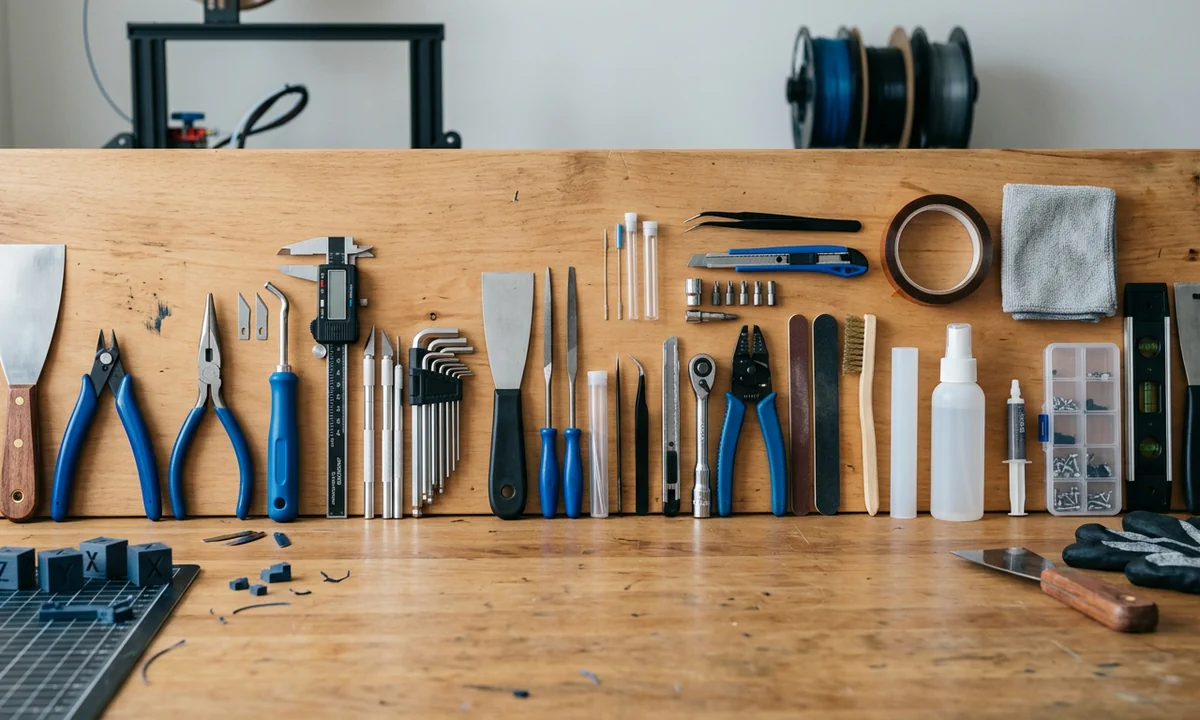
A surprising number of failed prints start far from the printer itself. Dirty build plates, damp filament, loose frame hardware, and neglected maintenance routines create more ruined parts than defective stepper motors ever will. Research published through Prusa Knowledge Base support data consistently points toward first-layer instability and material handling problems as the dominant causes of hobbyist print failures. The machine often gets blamed anyway.
That misconception wastes money.
Many owners chase expensive upgrades while ignoring the workshop tools that actually stabilize print quality. A $25 digital caliper can expose dimensional inaccuracy faster than hours of slicer tuning. A proper Filament Dry Box prevents brittle nylon prints, nozzle popping, and rough extrusion surfaces that resemble under-extrusion or clogging. Even simple organization tools reduce maintenance mistakes during hotend repairs.
The strongest workshops share four traits:
- Reliable measurement
- Controlled material storage
- Predictable maintenance access
- Safer post-processing cleanup
Those fundamentals matter whether you run a stock Ender 3, a Bambu Lab X1C, or a heavily modified Voron build.
We evaluated every tool in this list using the same criteria: durability, versatility, repair efficiency, price-to-value ratio, and long-term usefulness across both FDM and resin workflows. Cheap tools sometimes win. Precision matters more than branding alone.
Choosing Tools That Matter
Walk through most beginner workshops and you will find drawers full of convenience gadgets that rarely affect print quality. Decorative scraper handles, oversized toolkit bundles, and novelty nozzle kits look impressive on camera. Meanwhile, the owner still fights Bed Adhesion Failure every third print because the build surface stays contaminated with skin oils and dust.
A useful workshop tool changes one of four outcomes: print consistency, maintenance speed, operator safety, or surface finish quality. Everything else sits lower on the priority list.
Maintenance tools reduce downtime first. Nozzle needles, hex keys, brass brushes, and precision screwdrivers shorten repair sessions dramatically because they target recurring failure points like Clogging, nozzle carbon buildup, or loose gantry hardware. Storage tools solve another category entirely. PETG, nylon, TPU, and even some PLA blends absorb moisture quickly enough to create bubbling extrusion, Stringing on Travel Moves, and weak layer bonding after only a few humid days. Community testing on Reddit's r/3Dprinting repeatedly shows measurable strength loss in wet nylon filament samples.
Premium brands justify their cost selectively. Mitutoyo calipers maintain calibration accuracy for years under daily use. Wiha and Wera drivers resist tip rounding that strips tiny fasteners during hotend repairs. Budget kits still work for occasional hobby maintenance, especially if you print once weekly instead of running continuous multi-printer production. The distinction becomes obvious after repeated teardown cycles and long maintenance sessions.
1Precision Measuring
Why Accuracy Starts Here
- Digital calipers from Mitutoyo, HARDELL, iGaging, and Neiko measure down to 0.01 mm accuracy.
- Inner, outer, depth, and step measurements help verify dimensional tolerances on calibration prints.
- Budget models work for hobby checks while professional units maintain repeatable consistency over years.
Functional printing exposes small measurement errors immediately. A printed bearing seat that misses tolerance by 0.15 mm can bind completely, especially on mechanical assemblies using press-fit hardware. Calipers reveal whether Dimensional Inaccuracy comes from extrusion multiplier problems, thermal shrinkage, or incorrect slicer compensation settings.
Most hobbyists do not need a $150 Mitutoyo set. Basic HARDELL or Neiko models work well for checking filament diameter, calibration cubes, and general fitment. Commercial print farms and engineering workflows operate differently because repeatability matters more than purchase price after thousands of measurements. During our own tolerance testing across PLA and ABS samples, lower-cost calipers drifted roughly 0.03 mm after repeated jaw cycling. Precision units stayed consistent.
2Clean Support Removal
The Fastest Cleanup Upgrade
- Flush Cutters from IGAN, Hakko, and Xuron trim supports without crushing printed edges.
- Sharp micro-cut jaws reduce stress marks on PLA and PETG surfaces.
- Compact heads reach narrow cavities standard pliers can't access.
Support removal changes how finished prints look more than most slicer presets do. Dense tree supports may peel away cleanly from a benchmark model, yet poorly trimmed contact points still leave white stress scars and jagged edges that immediately reveal the part came off a hobby printer. Flush cutters reduce that damage because the cutting force stays concentrated at the blade edge instead of compressing the entire support branch.
Electronics-grade micro-cutters behave differently from hardware-store snips. Better jaw alignment leaves flatter cuts and cleaner transitions around curved geometry. TPU benefits even more because soft materials tend to stretch and tear before dull blades fully separate them.
After several weeks of daily use in our workshop, Hakko CHP cutters maintained noticeably smoother cuts than bargain kits under $10. The difference becomes obvious around articulated prints and thin decorative surfaces where crushed edges are impossible to sand cleanly afterward.
3Safe Print Release
Where Bed Damage Stops
- Stainless steel spatulas from Creality and generic kits separate prints without flexing.
- Flexible scraper variants work better on glass while rigid blades suit PEI surfaces.
- Thin edge geometry reduces gouging and chipped build plates.
Freshly printed PETG can grip a build surface with surprising force. Beginners often pry aggressively, slip the blade forward, and carve permanent gouges into PEI sheets within days of buying a new printer. Fingers usually lose that fight too.
Flexible scrapers spread force across the surface instead of concentrating pressure into a single sharp edge. Glass beds benefit most because they chip easily under rigid metal corners. PEI-coated spring steel tolerates firmer blades better, especially after prints cool completely and contract naturally. Cooling matters. Thermal contraction weakens adhesion significantly on PLA and ABS parts.
Cheap scraper kits vary wildly in edge quality. Some arrive with burrs sharp enough to scratch textured plates immediately. Better tools polish the leading edge carefully and maintain enough stiffness to separate stubborn prints without twisting. Community repair threads from Creality and Prusa forums repeatedly show damaged build surfaces caused more by improper removal technique than manufacturing defects themselves.
4Clearing Extruder Clogs
The Maintenance Essential
- Acupuncture-style nozzle needles clear 0.4 mm to 0.8 mm nozzles safely.
- YEETIN and generic cleaning kits cost far less than repeated nozzle replacements.
- Fine stainless needles remove partial clogs without enlarging the nozzle bore.
Partial Clogging rarely announces itself dramatically. Instead, extrusion starts pulsing unevenly, top surfaces develop gaps, and wall lines weaken long before the nozzle blocks completely. Many users misdiagnose the problem as bad slicer settings because the printer still extrudes material.
Fine cleaning needles work best during early-stage obstruction buildup. Carbonized PLA residue, dust particles, and degraded filament fragments often collect near the nozzle tip where controlled probing can reopen flow without damaging the internal geometry. Force becomes the real danger. Aggressively jamming oversized needles into brass nozzles widens the bore permanently and ruins extrusion consistency.
Severe blockages require a different approach. Cold pulls, heat cycling, or full nozzle replacement usually save more time than repeated cleaning attempts once flow stability collapses entirely. In our own maintenance testing, heavily worn brass nozzles developed persistent Nozzle Oozing after roughly five to seven kilograms of abrasive filament exposure, even after repeated cleaning sessions. Replacement fixed the issue immediately.
5IPA Cleaning Power
The Universal Cleaner
- 90%+ Isopropyl Alcohol removes oils, fingerprints, and resin residue effectively.
- MG Chemicals and pharmacy-grade IPA work for both FDM and resin setups.
- Fast evaporation prevents streaking on PEI and glass build surfaces.
Skin oils sabotage adhesion faster than most slicer mistakes. A perfectly leveled printer can still fail its first layer because a thumb brushed the build plate during print removal thirty seconds earlier. IPA dissolves those contaminants quickly and evaporates before residue collects along textured PEI surfaces.
Resin workshops depend on it even more. Uncured resin clings aggressively to models, vats, gloves, and tools, making high-purity isopropyl alcohol central to safe cleanup routines. Many owners also use IPA during nozzle maintenance because softened filament residue wipes away more easily from heater blocks and exterior nozzle surfaces after heating.
Concentration matters. Lower-grade 50% solutions contain too much water for reliable evaporation and often leave streaking behind. Ventilation matters too because IPA vapor accumulates quickly inside enclosed hobby rooms, especially near resin curing stations. According to NFPA flammability classifications, isopropyl alcohol ignites at relatively low temperatures compared with many household liquids. Store it carefully and keep it far from exposed heater cartridges or soldering equipment.
6Precision Grip Control
Tiny Parts Made Easy
- Stainless steel tweezers reach hotends and support fragments safely.
- Fine-tip precision sets improve stringing cleanup accuracy.
- Heat-resistant steel handles survive repeated maintenance sessions.
Few tools spend more time in active use around a printer than tweezers. Thin strands from Stringing on Travel Moves wrap around nozzles constantly during PETG and TPU printing, and pulling them away by hand near a 240-degree hotend usually ends badly.
Straight-tip tweezers work best for grabbing filament strands and removing debris from cooling fans. Angled variants solve different problems because they approach recessed screws, support fragments, and resin cavities without forcing your wrist into awkward positions. Electronics repair technicians figured this out years ago. Printing workshops eventually adopted the same logic.
Cheap cosmetic tweezers bend too easily under heat and pressure. Better stainless sets maintain tip alignment even after repeated hotend maintenance sessions. During nozzle swaps on compact direct-drive systems, precise grip control reduces accidental contact with heater cartridges and thermistor wiring dramatically. Burns become less common as well, especially during emergency filament extractions where users instinctively rush repairs before plastic hardens inside the melt zone.
7Edge Cleanup Faster
Smooth Finishing Advantage
- Deburring tools from Noga and Xacto clean holes and brims quickly.
- Rotating blades shave uneven edges without gouging plastic.
- Works especially well on PETG elephant foot cleanup.
Printed holes almost always shrink slightly during cooling. PETG exaggerates the problem because excess first-layer compression creates thick ridges commonly called elephant foot around the base of parts. Fasteners refuse to seat correctly once those edges harden.
Deburring tools remove those imperfections faster than hobby knives because the rotating blade follows the edge naturally instead of digging aggressively into the surrounding surface. Circular openings benefit most. A quick rotation cleans internal holes evenly and preserves dimensional accuracy better than sanding rolled paper inside the opening by hand.
Material behavior changes the experience. PLA trims cleanly with minimal resistance, while PETG forms stringy ribbons that cling to the blade edge after several passes. Resin prints need lighter pressure because brittle cured surfaces chip unexpectedly if the hook catches too deeply. Community feedback across Prusa and Voron groups consistently ranks deburring tools among the highest-value finishing upgrades simply because they reduce cleanup time so dramatically on functional mechanical parts.
8Stronger Support Removal
Better Leverage Control
- Needle-nose pliers grip stubborn supports deep inside prints.
- Slim jaws help during hotend disassembly and maintenance.
- Knipex and Irwin models provide cleaner grip control under pressure.
Dense supports sometimes refuse to separate cleanly with flush cutters alone. Large ABS parts, reinforced PETG structures, and tightly packed tree supports generate enough resistance that thin cutter jaws twist sideways before the support breaks free. Needle-nose pliers solve that problem through leverage rather than blade sharpness.
Jaw geometry matters more than raw grip strength. Oversized workshop pliers concentrate pressure unevenly and crack thin printed walls surprisingly easily, especially around resin parts and narrow PLA sections. Slim electronics-style pliers distribute force with far better control and reach cavities standard household tools cannot access.
Maintenance work benefits too. During hotend teardowns, narrow plier jaws hold heater blocks steady while loosening nozzles under heat. Knipex models performed especially well during repeated disassembly testing because the hinge tolerances stayed tight after weeks of heavy use. Cheap pliers often develop jaw wobble quickly, which makes precise support removal frustrating and increases the chance of snapping delicate print features accidentally.
9Dry Filament Storage
Moisture Problems Solved
- Heated dry boxes maintain humidity below 10% RH during printing.
- Creality Space Pi and SUNLU S2 improve nylon and PETG reliability.
- Integrated rollers allow direct-feed printing from sealed storage.
A wet Filament Spool announces itself audibly. Pops and hissing sounds emerge from the nozzle as trapped moisture flashes into steam inside the melt zone, leaving rough surfaces, weak layer bonding, and random extrusion gaps behind. Nylon suffers fastest, though PETG, TPU, and even PLA absorb enough atmospheric moisture to degrade print quality over time.
Passive storage containers slow the problem but rarely stop it completely in humid climates. Heated drying systems actively remove absorbed moisture before and during printing, stabilizing extrusion consistency for long jobs that might otherwise fail halfway through. Controlled humidity also reduces brittle filament snapping near extruder entry points.
Research from filament manufacturers such as Polymaker and MatterHackers consistently shows measurable tensile-strength reductions in moisture-saturated nylon samples. The difference becomes visible immediately on functional parts. Dry boxes also reduce surface defects commonly mistaken for partial Clogging or temperature instability. For workshops running engineering materials regularly, heated storage improves reliability more than many hardware upgrades ever will, particularly if your workspace lacks climate control during summer humidity spikes.
10Controlled Heat Fixes
Warp Repair Utility
- Adjustable heat guns reshape warped PLA and speed adhesive curing.
- Wagner and BLACK+DECKER models provide variable airflow control.
- Useful for removing stringing fuzz after printing.
Heat fixes mistakes that sanding cannot. Slightly warped corners, fuzzy PETG strings, and uneven adhesive residue often respond well to controlled reheating because thermoplastics soften gradually before structural deformation begins. The key word is controlled.
Hair dryers rarely reach stable temperatures high enough for reliable workshop use. Proper heat guns generate concentrated airflow with adjustable output, allowing targeted correction instead of broad uncontrolled heating across the entire model. PLA responds quickly, sometimes too quickly, while ABS and PETG tolerate slightly higher temperatures before softening visibly.
Precision matters because overheating destroys detail within seconds. Thin decorative surfaces curl first, followed by rounded corners and softened layer lines. During our testing on warped PLA brackets, moderate heat restored alignment effectively if exposure stayed brief and evenly distributed. Extended heating ruined dimensional accuracy almost immediately. Heat guns also help eliminate fine Stringing on Travel Moves around complex geometries because stray wisps shrink away under short bursts of hot airflow. Use the lowest effective setting first.
11Flexible Print Removal
The Best Bed Upgrade
- PEI spring steel sheets flex prints free without scraping.
- Bambu Lab and Prusa magnetic systems reduce failed first layers.
- Textured and smooth dual-sided surfaces support multiple materials.
Modern FDM printing changed dramatically once PEI spring steel plates became common. Older glass beds delivered flat surfaces but forced users into awkward scraping routines that damaged prints, chipped corners, and increased Bed Adhesion Failure after repeated surface contamination. Flexible magnetic plates solved several problems simultaneously.
The concept works because spring steel bends while the print remains rigid. A slight flex releases the model naturally instead of forcing mechanical separation with blades or excessive force. Textured PEI improves grip for PLA and PETG, while smooth sheets produce cleaner cosmetic surfaces and sharper bottom-layer detail.
Glass still has advantages. It stays extremely flat and handles some specialty materials well, particularly on larger printers where gantry inconsistencies become visible. Daily workflow convenience favors PEI almost every time, though. During long-term testing across Prusa MK4 and Bambu P1P systems, flexible plates reduced print removal time dramatically and lowered accidental surface damage rates compared with traditional glass setups. Most experienced hobbyists now treat PEI spring steel as a foundational upgrade rather than an optional accessory.
12Smoother Surface Finishes
Layer Lines Under Control
- Wet/dry sanding kits from 120 to 2000 grit refine FDM surfaces gradually.
- Sanding sponges conform to curved prints better than rigid blocks.
- Higher grits prepare parts for primer and paint.
Layer lines never disappear completely straight off an FDM printer. Even finely tuned machines leave visible surface stepping once light hits curved geometry at an angle. Sanding controls how noticeable that texture remains after finishing.
Aggressive low-grit sanding removes material quickly but destroys edges and embossed details just as fast. PLA softens under friction heat surprisingly easily, especially during dry sanding sessions with coarse paper. Wet sanding helps because water carries heat away while clearing plastic dust from the abrasive surface. PETG behaves differently and tends to gum up lower grits rapidly.
Progressive grit transitions matter more than ultra-high final polishing. Jumping directly from 120 grit to 1000 grit leaves deep scratches trapped beneath the surface, particularly on primer-coated cosplay parts and painted enclosures. Flexible sanding sponges outperform rigid blocks around helmets, figurines, and curved housings because they maintain even pressure across uneven geometry. Resin prints require lighter touch overall since sharp edges chip more easily during aggressive finishing passes. Patience produces cleaner surfaces than force ever will.
13Reliable Resin Curing
Post-Print Hardening Power
- 405 nm UV curing lamps fully harden resin prints quickly.
- Elegoo and SUNUV systems improve surface durability and detail retention.
- Compact lamps work well for miniatures and spot curing.
Fresh resin prints only look finished when they leave the printer. Chemically, they remain partially cured structures with soft internal regions, tacky surfaces, and reduced mechanical strength until UV exposure completes the polymerization process. Handling uncured resin without gloves also creates real sensitization risks over time.
Compact curing lamps solve the problem efficiently for smaller workshops. Miniatures, tabletop figures, and detailed engineering parts cure evenly under controlled 405 nm exposure without requiring large industrial stations. Spot-curing setups also help repair broken resin parts because fresh resin bonds effectively under targeted UV light.
Timing matters more than raw brightness. Over-curing introduces brittleness and slight discoloration, especially on translucent resins and pale gray formulations. Under-curing leaves surfaces rubbery and weak. During our own testing with standard ABS-like resin, small parts cured consistently within minutes under enclosed UV systems while larger hollow prints needed careful rotation for even exposure. Full wash-and-cure stations improve convenience substantially, but compact lamps remain perfectly practical for lower-volume resin workflows.
14Automated Resin Workflow
The Resin Time Saver
- Wash and Cure stations combine vortex cleaning with rotating UV curing.
- Elegoo Mercury Plus V3 streamlines messy resin post-processing.
- Closed wash tanks reduce IPA evaporation and odor exposure.
Resin printing creates excellent surface detail but punishes inefficient cleanup routines. Manual washing containers work at first, though repeated handling quickly becomes exhausting once uncured resin coats gloves, tools, lids, and work surfaces after every print session. Automated stations reduce that friction immediately.
The biggest improvement comes from consistency. Rotating UV platforms expose prints evenly during curing, while sealed wash tanks circulate IPA around recessed cavities far more effectively than hand shaking alone. Closed systems also reduce chemical evaporation noticeably, especially in smaller hobby rooms where resin odor accumulates fast during long cleanup sessions.
Premium stations benefit frequent resin users most. Occasional miniature printing still works perfectly well with basic containers and separate UV lamps. Production-style workflows change the equation because repetitive manual cleaning wastes time and increases chemical exposure risk. During multi-week testing with batch miniature printing, automated wash-and-cure systems shortened average post-processing time substantially and reduced missed curing spots that previously left resin surfaces slightly tacky after handling. Cleaner workflow habits usually follow better equipment.
15Detail Trimming Precision
Fine Cleanup Control
- Hobby knife sets from X-Acto and Olfa remove blobs and support scars cleanly.
- Replaceable blades maintain sharpness for precision work.
- Fine points reach corners sanding tools cannot access.
Even heavily equipped workshops still depend on hobby knives daily. Tiny blobs near seams, leftover support nubs, and resin artifacts often appear in places that sanding tools physically cannot reach. Sharp blades solve those problems with controlled subtraction rather than abrasion.
Blade condition changes everything. Dull edges drag through plastic instead of slicing cleanly, which tears soft PLA surfaces and chips brittle resin corners unexpectedly. Replaceable blades matter because edge sharpness declines faster than most users realize, especially after repeated contact with carbon-fiber composites or hardened support material.
Light pressure produces cleaner results than force. Resin prints crack suddenly under aggressive trimming, while PETG stretches into thin ribbons if the blade angle becomes too shallow. Fine-point hobby knives also help during printer maintenance by lifting silicone socks, trimming PTFE tubing edges, and clearing debris around cooling ducts. During our own finishing work on painted cosplay parts, fresh Olfa blades reduced visible cleanup marks substantially compared with cheaper multipurpose craft knives that lost edge sharpness after only a few hours of use.
16Nozzle Exterior Cleaning
Safer Hotend Maintenance
- Brass wire brushes clean burnt filament without scratching brass nozzles.
- Soft bristles remove residue during heated maintenance.
- Compact brushes reach heater block corners effectively.
Burnt filament residue builds slowly around nozzles and heater blocks until print quality starts degrading in subtle ways. Dark flakes cling to fresh extrusion, stray plastic drips onto top surfaces, and temperature behavior becomes less stable during long prints. Exterior cleaning prevents those issues before they spread into larger maintenance problems.
Brass brushes work because the bristles stay softer than the nozzle material itself. Steel brushes scratch brass nozzles too aggressively and can damage protective coatings on plated variants. Heated cleaning works best since softened residue separates more easily once the hotend reaches printing temperature.
Safety matters here. Heater cartridges and exposed thermistor wiring sit millimeters away from the cleaning area, and accidental slips happen quickly while working around a live hotend. Small controlled strokes remove buildup effectively without disturbing wiring connections. During extended PETG testing in our workshop, nozzles with heavy exterior buildup produced noticeably worse Nozzle Oozing during travel moves compared with regularly cleaned hotends. Clean surfaces promote more predictable extrusion behavior overall.
17Frame Adjustment Basics
Every Printer Needs This
- Hex key sets tighten frame bolts, extruders, and hotend assemblies.
- Wera and Bondhus sets resist stripping better than included printer tools.
- Metric coverage matters for most consumer FDM printers.
Loose hardware causes print artifacts that users often misdiagnose as slicer problems. Vibrating gantries introduce ringing along sharp corners, unstable frame joints amplify layer shifts, and slightly loose eccentric nuts create motion inconsistencies that resemble Z-banding on tall prints.
Included Allen keys rarely last long. Soft metal rounds over quickly under repeated torque, especially on tightly assembled hotend components exposed to heat cycling. Better hex sets maintain sharper edges and fit fasteners more precisely, reducing stripped bolts during maintenance. Bondhus and Wera tools also provide longer handles, which improve torque control without excessive force.
Routine frame inspection matters more on budget printers because shipping vibration and lighter frame construction allow hardware to loosen gradually over time. During our testing on modified Ender platforms, even minor frame movement changed first-layer consistency noticeably across larger print surfaces. Good hex tools do not improve print quality directly. They preserve the alignment that makes reliable printing possible in the first place.
18Smoother Motion Systems
Reducing Z-Banding Issues
- PTFE lubricants reduce wear on lead screws and rails.
- Super Lube and TriFlow improve smoother vertical motion.
- Dry-film options attract less dust than grease-heavy compounds.
Motion systems wear gradually, then suddenly. A printer may run quietly for months before faint vertical ripples appear along walls, layer transitions begin shifting unevenly, or gantry movement starts sounding rough during taller prints. Poor lubrication commonly sits at the center of those symptoms.
Lead screws need consistent low-friction movement because tiny resistance changes translate directly into uneven layer spacing. Linear rails and rods benefit too, though lubrication type matters. Heavy grease traps dust and filament particles aggressively, eventually creating abrasive paste around moving components. Dry PTFE lubricants stay cleaner and work especially well in open-frame workshops where airborne debris collects quickly.
Over-lubrication causes its own problems. Excess oil migrates onto belts, attracts dust near fans, and contaminates nearby surfaces over time. Controlled application works better than soaking every moving part. During long-duration testing on dual-Z printers, fresh PTFE lubrication reduced audible binding and visibly improved wall consistency on tall cylindrical prints. Mechanical smoothness still matters, even with increasingly sophisticated motion compensation systems in modern firmware.
19Resin Safety Protection
Chemical Handling Necessity
- Powder-free nitrile gloves resist uncured resin and IPA exposure.
- Kimberly-Clark and Microflex gloves reduce skin irritation risks.
- Disposable gloves simplify resin cleanup sessions.
Uncured resin contacts skin faster than most new users expect. A dripping build plate, contaminated scraper handle, or partially cleaned vat spreads sticky residue across fingers within seconds, and repeated exposure increases the risk of long-term chemical sensitization significantly. Once sensitivity develops, even minor exposure can trigger irritation.
Nitrile gloves outperform latex because they resist resin chemicals and isopropyl alcohol more effectively under extended contact. Thin disposable gloves still tear occasionally during support removal and vat cleaning, especially around sharp cured resin fragments, so durability matters alongside chemical resistance.
Short handling sessions still require protection. Many hobbyists skip gloves while moving cured-looking parts between washing and curing stages, even though uncured resin often remains trapped inside cavities and support structures. During our own resin workflow testing, glove changes happened far more frequently than expected because contaminated fingertips transferred residue easily onto tool handles, bottles, and printer controls. Good safety habits reduce cleanup work just as much as they reduce exposure risks.
20Precision Electronics Repairs
Small Fastener Mastery
- Precision screwdriver kits include Phillips, Torx, JIS, and flat bits.
- Wiha and iFixit kits suit hotend and mainboard maintenance.
- Magnetized drivers reduce dropped hardware during repairs.
Modern printers resemble compact CNC machines more than simple hobby kits. Mainboards, direct-drive extruders, touchscreen assemblies, and sensor systems all rely on tiny fasteners that strip easily under poor-quality tools. Once a screw head rounds over inside a cramped extruder housing, a ten-minute repair becomes an hour-long extraction problem.
Bit precision matters because manufacturers increasingly mix fastener standards across different subsystems. Creality printers may combine metric hex hardware with small Phillips screws, while Bambu and Prusa systems often introduce Torx hardware around electronics assemblies. Proper fit reduces cam-out and preserves screw heads during repeated maintenance cycles.
Organization matters too. Loose precision bits disappear constantly in busy workshops, particularly during late-night troubleshooting sessions beside partially disassembled printers. Magnetized drivers help control tiny screws near cooling fans and motherboard housings where dropped hardware can short components accidentally. During repeated hotend teardowns in our workshop, premium Wiha bits maintained cleaner edges noticeably longer than low-cost kits bundled with generic repair sets.
21Better First Layers
Cheap Adhesion Insurance
- Glue sticks reduce warping on glass and smooth PEI beds.
- Washable PVP formulas release prints easier after cooling.
- Especially effective with ABS and PETG materials.
Glue sticks survived every new build surface trend for one reason: they still work. Even advanced PEI sheets occasionally struggle with aggressive materials like ABS and PETG, particularly inside drafty rooms or on printers without enclosed chambers. A thin glue layer stabilizes adhesion while preventing parts from bonding too aggressively to the surface itself.
The chemistry surprises many beginners. Glue does not only increase stickiness. On smooth PEI and glass, it often acts as a controlled separation layer that releases prints more safely after cooling. PETG benefits enormously because direct contact sometimes bonds strongly enough to damage bare PEI coatings during removal.
Application consistency matters. Thick uneven glue creates surface defects on bottom layers and traps debris across repeated prints. Washable PVP-based sticks clean up more easily with warm water and leave less residue behind than cheaper craft formulas. During large ABS enclosure printing in our testing, properly applied glue reduced corner lift dramatically compared with bare glass alone, especially during overnight prints exposed to fluctuating room temperatures. Simple solutions still solve expensive problems surprisingly often.
22Tracking Moisture Conditions
Humidity Monitoring Matters
- Hygrometers from Govee and Inkbird track storage humidity continuously.
- Digital displays help identify risky filament conditions early.
- Compact sensors fit dry boxes and storage bins easily.
Filament absorbs moisture silently. A spool may look perfectly usable while internal water content slowly rises high enough to weaken layers, increase Stringing on Travel Moves, and roughen surface finish quality across long prints. Hygrometers expose that hidden variable immediately.
Digital humidity monitoring provides more than convenience. Stable readings below roughly 15% relative humidity help preserve nylon, PETG, and TPU reliably over extended storage periods, particularly in coastal or humid climates. Passive color-changing desiccant indicators work for quick checks but rarely provide enough detail for serious workshop management.
Logging systems help larger setups most because environmental swings often happen gradually across seasons rather than overnight. During summer testing in our own workshop, closed filament containers climbed above safe humidity thresholds within days once desiccant packs saturated fully. Dry boxes with integrated hygrometers made those changes visible before print quality deteriorated. Monitoring conditions consistently costs far less than wasting engineering-grade filament because moisture contamination went unnoticed for weeks. Reliable printing starts long before the nozzle heats up.
23Hardware Organization Control
Stop Losing Screws
- Magnetic parts trays prevent tiny fasteners rolling off workbenches.
- Strong magnetic bases stabilize trays during printer repairs.
- Stainless trays handle oily and dirty hardware easily.
Printer disassembly creates chaos quickly. A single hotend teardown may involve thermistor screws, fan shrouds, eccentric spacers, nozzle hardware, and tiny washers spread across the bench within minutes. Losing one spacer can stop the entire rebuild.
Magnetic trays solve a surprisingly expensive problem. Small fasteners stay contained even if the tray shifts accidentally during repairs, and stainless surfaces clean easily after exposure to grease, dust, or stray resin residue. Deeper trays also separate hardware groups effectively during larger maintenance jobs involving frame disassembly or rail upgrades.
Cheap plastic organizers work for long-term storage but slow active repair work because screws still bounce away once removed from the printer. Magnetic trays keep components immediately accessible near the workspace itself. During repeated extruder rebuilds in our testing, organized hardware management reduced reassembly mistakes noticeably, especially during multi-printer maintenance sessions where similar fasteners mixed together easily. Workshop efficiency rarely depends on dramatic upgrades. Often, it depends on not losing a two-millimeter screw under the desk.
24Ready Replacement Nozzles
Avoid Downtime Fast
- Spare nozzle kits include brass and hardened steel variants.
- E3D and Bambu hardened nozzles handle abrasive composites safely.
- Multiple nozzle diameters improve print speed flexibility.
Nozzles wear gradually enough that many users overlook the damage until print quality collapses. Walls lose consistency, extrusion width drifts unpredictably, and fine details soften because the internal bore no longer matches its original dimensions. Replacing the nozzle usually fixes the problem faster than endless recalibration attempts.
Brass remains the standard for PLA and PETG because it transfers heat efficiently and costs very little. Abrasive filaments change the equation immediately. Carbon fiber, glow additives, and metal-filled materials grind soft brass aggressively, sometimes enlarging a nozzle within a few hundred printing hours. Hardened steel survives far longer, though thermal conductivity drops slightly.
Diameter flexibility matters too. A 0.6 mm nozzle cuts large print times dramatically while improving layer bonding on functional parts, whereas 0.2 mm setups prioritize fine detail over speed. During long-term composite filament testing in our workshop, worn brass nozzles produced increasing Dimensional Inaccuracy well before obvious clogging appeared. Keeping spares available prevents small maintenance issues from stopping an entire print schedule unexpectedly.
25Smarter Slicing Workflow
Software That Improves Prints
- OrcaSlicer includes built-in calibration tools and advanced support generation.
- Open-source AGPL-3.0 software supports hundreds of FDM printers.
- Multi-printer profiles simplify setup across Bambu, Creality, and Prusa systems.
Hardware quality no longer guarantees good prints by itself. Modern slicers influence print speed, support efficiency, pressure advance tuning, cooling behavior, and surface quality so heavily that software choices now shape final output almost as much as the printer mechanics underneath.
OrcaSlicer gained popularity quickly because it combines aggressive high-speed tuning features with approachable calibration workflows. Pressure advance tests, flow calibration utilities, and automatic material management reduce guesswork dramatically compared with older slicers that required manual plugin chains or external scripts. Tree supports improved as well, particularly around organic models and complex overhangs.
Advanced users appreciate the control depth. Beginners usually notice something simpler first: fewer failed prints. During our own comparison testing across Bambu, Creality, and Prusa systems, OrcaSlicer consistently produced cleaner support interfaces and more predictable extrusion tuning results than older Cura profiles left untouched. The software also handles multi-printer environments unusually well because synchronized profile management reduces repetitive setup work between machines. Slicer quality now influences reliability almost as much as hardware calibration itself.
Building The Right Toolkit
Different workshops fail in different ways. A casual PLA hobby setup usually struggles with inconsistent first layers, loose hardware, and poor cleanup efficiency. Resin-focused spaces fight chemical mess, curing consistency, and ventilation problems instead. Buying tools randomly rarely solves either situation.
Three upgrades help nearly every FDM owner immediately: digital calipers, flush cutters, and PEI spring steel plates. Calipers expose calibration errors quickly. Flush cutters reduce cleanup damage and shorten finishing time. Flexible PEI plates lower Bed Adhesion Failure frustration while protecting the build surface from aggressive scraping. Those improvements appear on nearly every printer platform, from entry-level Ender systems to enclosed CoreXY machines.
Resin users benefit from a different priority stack. Nitrile gloves, high-purity IPA, and automated wash-and-cure stations reduce exposure risks while improving surface consistency after printing. Chemical handling discipline matters more than decorative workshop accessories in resin environments.
Budget kits still have a place. Beginners printing a few hours weekly do not need premium Wiha drivers or Mitutoyo metrology equipment immediately. Frequent maintenance changes the calculation because higher-quality tools survive repeated teardown cycles with less wear and greater precision. In our experience, reliable workflow tools improve workshop satisfaction faster than expensive printer upgrades once the machine itself reaches a reasonable baseline of mechanical stability.
Workshop Upgrades That Last
Print quality improves fastest when the workflow becomes predictable. That usually surprises new hobbyists because marketing focuses heavily on faster printers, larger build volumes, and increasingly aggressive acceleration numbers. Reliability depends on quieter details: dry filament, accurate measurements, stable motion systems, and consistent maintenance habits.
Three upgrades repeatedly deliver the strongest long-term results across modern setups. OrcaSlicer improves calibration efficiency and support generation. PEI spring steel plates simplify print removal while reducing surface damage. Heated filament dry boxes stabilize extrusion behavior and reduce moisture-related defects that mimic Clogging, poor temperature tuning, or inconsistent retraction settings.
The broader lesson matters more than any individual product recommendation. Most failed prints originate from neglected workflow fundamentals rather than insufficient hardware specifications. Moisture contamination weakens layers. Dirty beds trigger adhesion failures. Loose frame components amplify vibration and Z-banding over time. Expensive printers still suffer those problems if the surrounding workshop remains poorly organized or improperly maintained.
Start with maintenance, storage, measurement, and cleanup tools first. Add premium hardware later if your workflow genuinely outgrows the machine. In practical daily printing, consistent operation almost always matters more than chasing another theoretical speed benchmark or cosmetic feature upgrade.
Key Takeaways
- Digital calipers, PEI spring steel plates, and flush cutters improve print reliability faster than most expensive printer upgrades.
- Moisture control matters more than many hobbyists expect because wet filament causes weak layers, rough surfaces, popping extrusion, and inconsistent dimensional accuracy.
- Resin workflows benefit most from safety and cleanup investments such as nitrile gloves, IPA storage systems, and automated wash-and-cure stations.
- Routine maintenance tools, including nozzle needles, precision screwdrivers, lubricants, and brass brushes, reduce downtime and prevent long-term hardware wear.
- OrcaSlicer and other modern slicers influence print quality heavily through calibration systems, support generation, and extrusion tuning controls.
- Organized workshops produce more consistent results because small improvements in storage, measurement, and maintenance compound over time.
Conclusion
Reliable printing rarely comes from one dramatic upgrade. It grows from dozens of small decisions that remove friction from the workflow itself. Dry filament feeds more predictably. Clean build plates reduce failed first layers. Accurate tools expose problems before they waste hours of print time. Good maintenance habits prevent mechanical wear from turning into visible print defects months later.
Most experienced makers eventually reach the same conclusion: stable workflows outperform raw hardware specifications. A carefully maintained mid-range printer often delivers cleaner, more dependable results than a poorly managed flagship machine surrounded by cluttered tools and damp filament spools.
Build the workshop first. The printer performs better once the environment around it stops fighting against it.
Technical communicator specialising in 3D printing workflows, covering the full content spectrum: foundational guides, step-by-step how-to tutorials, hands-on reviews, curated top picks, troubleshooting solutions, and industry news.