
FDM vs SLA: The Beginner's Guide to Filament vs Resin 3D Printing

Confused by FDM vs SLA and resin 3d printing vs filament differences? This beginner-friendly breakdown makes choosing your first 3D printer far less intimidating. Read the full guide.
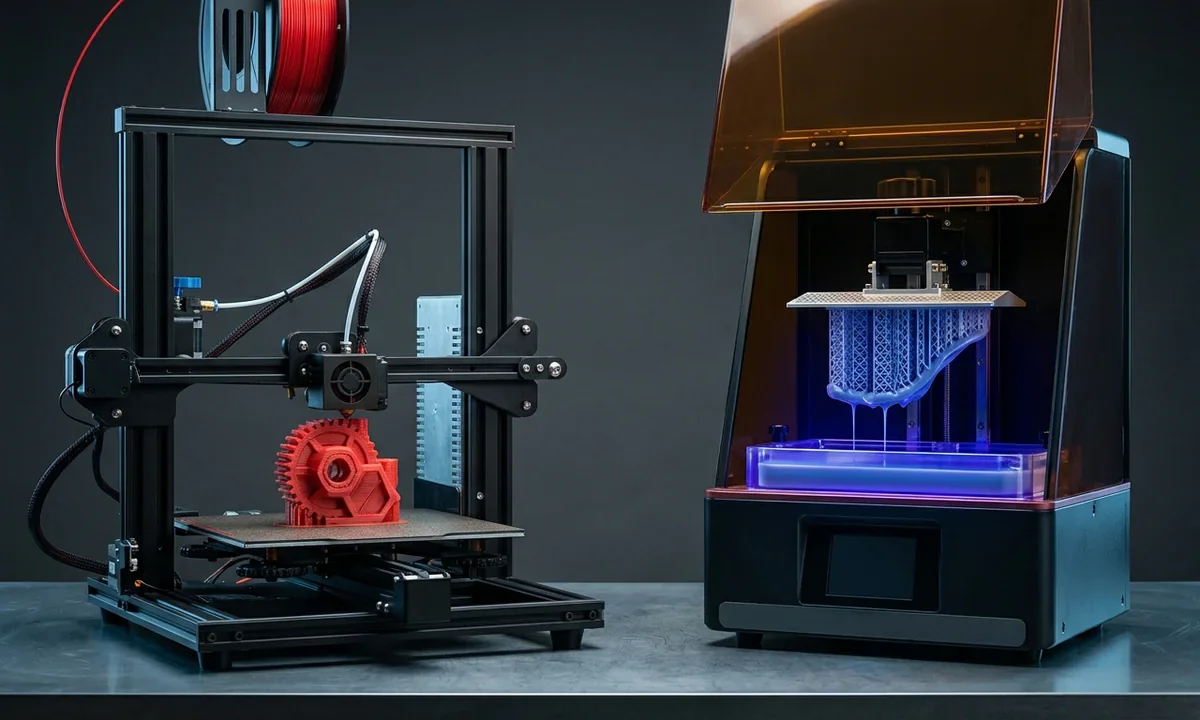
A first 3D printer purchase usually starts with a simple goal: print parts at home. Ten browser tabs later, most beginners find themselves comparing resin vats, heated nozzles, layer heights, wash stations, and ventilation systems they did not expect to research. The central difference between FDM vs SLA printing comes down to material and process. FDM printers melt solid filament through a nozzle, while SLA machines harden liquid resin with ultraviolet light. Neither system dominates every category.
Cost confuses buyers first. A decent entry-level FDM machine such as the Bambu Lab A1 Mini or Creality Ender 3 V3 SE starts around $200 to $350, and PLA filament often costs $18 to $30 per kilogram. Resin printers occupy a similar hardware range now, especially from Elegoo and Anycubic, yet the surrounding equipment changes the math quickly. Gloves, resin exposure protection, alcohol washing stations, curing lamps, disposable filters, and ventilation add recurring expense.
Print quality creates another layer of confusion. Resin 3D Printing vs filament printing comparisons online often exaggerate the difference. SLA printers absolutely produce smoother surfaces and sharper miniature details, especially below 0.05 mm layer heights. FDM machines, though, build stronger mechanical parts more economically and usually with less post-processing.
Workspace requirements matter just as much. Filament printers tolerate bedrooms, garages, and classrooms reasonably well if temperatures stay stable and filament moisture remains controlled. Resin systems demand airflow management and careful chemical handling.
That trade-off shapes almost every buying decision.
How FDM 3D Printing Works
Molten plastic moving through a brass nozzle still defines consumer 3D printing. FDM, short for fused deposition modeling, pushes thermoplastic filament through a heated print head and deposits material layer by layer across a build surface. Most hobby printers use Material Extrusion systems with nozzle diameters between 0.2 mm and 0.6 mm. A slicer converts the digital model into movement paths, extrusion rates, temperatures, and cooling instructions before the printer begins.
PLA remains the dominant beginner material because it prints at relatively low temperatures, usually 190°C to 220°C, and resists warping better than ABS. PETG, TPU, nylon, and carbon-fiber-filled composites expand the material range once users gain experience. Many entry-level systems now include automatic bed leveling, direct-drive extruders, and Heated Build Plate systems that improve first-layer consistency. Ten years ago, beginners spent hours manually adjusting offsets. Current machines need far less intervention.
FDM dominates starter setups largely because ownership costs stay predictable. A spool of decent PLA can produce dozens of functional brackets, cosplay parts, organizers, or prototype housings before replacement. Large build volumes also favor filament systems. Printers like the Sovol SV06 Plus or Elegoo Neptune 4 Plus handle helmets and engineering prototypes that would exceed most desktop resin printer capacities.
Surface finish remains the obvious weakness. Layer lines appear visibly on curved surfaces unless users print slowly with thin layer heights, sand the part afterward, or apply filler primers. Precision varies by machine quality and tuning, though well-calibrated consumer printers commonly achieve dimensional accuracy around ±0.1 mm to ±0.3 mm.
Mechanical durability gives FDM another advantage. Filament prints flex under stress more naturally than brittle standard resin. Functional hinges, tool holders, jigs, and replacement appliance parts generally survive repeated use better with thermoplastics.
Failures still happen. Wet filament pops during extrusion, poorly tuned retraction settings create stringing, and uneven cooling can warp corners off the build plate. Beginners also underestimate Support Material cleanup time, especially on complex overhangs.
Inside SLA Resin 3D Printing
Liquid resin behaves very differently from heated filament. SLA and related masked stereolithography printers build parts by exposing photopolymer resin to ultraviolet light, curing each layer inside a shallow resin vat before lifting the model upward for the next exposure cycle. Desktop systems such as the Elegoo Mars 5 Ultra and Anycubic Photon Mono series usually rely on LCD masking screens rather than laser-driven industrial SLA optics, but the result looks similar to most new users: exceptionally smooth surfaces.
Miniature painters notice the difference immediately. Facial features, armor textures, engraved lettering, and tiny organic contours print with far sharper edge definition than most FDM setups can achieve, especially below 50 microns. Resin also handles cosmetic prototypes well because the finished surface requires less sanding before painting or molding.
That visual quality comes with extra handling steps. After printing, users remove uncured resin from the model with isopropyl alcohol or dedicated cleaning fluids, detach support structures, then complete final UV curing. Curing Time depends on resin chemistry, model thickness, and light intensity, though hobby parts often finish within two to ten minutes inside a consumer curing station.
Safety deserves direct attention here because resin marketing sometimes understates the issue. Uncured photopolymer resin can irritate skin quickly, and fumes become unpleasant in small rooms with poor airflow. Wear nitrile gloves. Ventilate the workspace properly. Some manufacturers now offer lower-odor plant-based formulations, but even those require careful cleanup and disposal.
Material choice has expanded rapidly during the last five years. Tough engineering resins, flexible formulations, high-temperature blends, castable jewelry resins, and dental-certified materials now exist at consumer scale. Prices remain higher than filament, usually $30 to $80 per liter for hobby materials.
Speed comparisons create confusion online. Individual resin layers cure simultaneously across the build plate, so printing ten miniatures often takes nearly the same time as printing one. Tall models still increase overall print duration substantially.
FDM vs Resin Compared
Numbers help cut through most online arguments. A beginner deciding between an sla 3d printer vs fdm setup usually cares about six things: surface quality, strength, speed, operating cost, maintenance, and workspace practicality. The technologies separate quickly once those categories become measurable instead of emotional.
Resin printers produce finer visual detail. Standard desktop SLA systems regularly print at 35 to 50 micron XY resolution, with layer heights reaching 0.01 mm on some machines. Curved surfaces appear smoother because the cured resin transitions between layers more subtly than extruded plastic. Tabletop miniatures, jewelry masters, and dental aligner molds benefit directly from that precision.
FDM systems answer with durability and versatility. PLA prints remain rigid and easy to produce, PETG handles impact resistance better, and engineering-grade nylons tolerate stress loads that standard resin cannot survive repeatedly. Functional brackets, shop fixtures, replacement parts, and large cosplay sections generally fit filament printing better.
Print speed comparisons depend heavily on geometry. A single resin miniature may finish faster than an FDM equivalent because the printer cures entire layers at once. Large solid objects reverse the equation. Resin exposure cycles become slower as model height increases, while modern CoreXY filament printers now exceed 300 mm/s travel speeds under realistic conditions.
Maintenance workload differs more than marketing suggests. Filament printers need nozzle cleaning, belt tension checks, occasional lubrication, and careful filament storage to avoid moisture absorption. Resin machines require vat cleaning, filter replacement, spill management, alcohol disposal, and regular inspection of the LCD masking screen.
The table below summarizes the practical differences most beginners notice within their first three months.
| Category | FDM 3D Printing | SLA Resin 3D Printing |
|---|---|---|
| Mechanism | Melts filament through heated Extrusion nozzle | Cures liquid resin with UV light |
| Typical Materials | PLA, PETG, ABS, TPU, nylon | Standard, tough, flexible, dental resin |
| Surface Finish | Visible layer lines | Smooth cosmetic finish |
| Dimensional Accuracy | Usually ±0.1 mm to ±0.3 mm | Often ±0.05 mm to ±0.15 mm |
| Mechanical Strength | Better for load-bearing parts | Better for detail than impact resistance |
| Build Volume | Larger on affordable machines | Smaller on most desktop systems |
| Post-Processing | Support trimming, sanding | Washing, curing, resin cleanup |
| Workspace Needs | Moderate ventilation | Strong ventilation recommended |
| Consumable Cost | Lower material cost | Higher resin and cleanup supply cost |
| Best Use Case | Functional parts and large props | Miniatures and cosmetic prototypes |
Machine pricing overlaps now. Good consumer FDM printers commonly range from $250 to $900, while hobby resin systems fall between $220 and $700 before accessories. Hidden ownership costs create the bigger difference. Resin users buy gloves, paper towels, wash containers, replacement FEP films, UV curing equipment, and cleaning alcohol continuously. Filament users spend more gradually, mostly on nozzles, spare build plates, and dry storage.
Industrial accessibility also diverges. Small professional workshops widely use both technologies, but large-scale manufacturing still leans heavily toward industrial filament systems for tooling and engineering prototypes. High-end SLA platforms from Formlabs, 3D Systems, and Stratasys remain common in dental labs and medical modeling because surface fidelity matters more than mechanical toughness in those fields.
Which Printer Fits You?
The right printer depends less on technology hype and more on what you expect to build repeatedly. Someone printing articulated dragons for online marketplaces faces a very different decision than a maker producing garage storage brackets or cosplay armor sections.
Miniature painters usually benefit from resin first. Fine facial features, chainmail textures, and tiny support structures print cleanly enough that light priming often hides layer transitions completely. A modern 8K desktop resin printer can produce tabletop figures that approach injection-molded appearance at normal viewing distance. Cleanup remains messy, though. Resin drips, failed supports, and alcohol washing become part of the routine.
Cosplay builders often prefer FDM because scale changes everything. Printing a full helmet or chest plate on a filament machine costs dramatically less than producing the same volume with resin. Large-format FDM printers also handle segmented armor pieces more efficiently. Sanding and filler work take time afterward, but thermoplastic parts survive drops and transport better.
Engineering prototypes split into two categories. Mechanical test parts usually belong on filament systems because PETG, ABS, ASA, and nylon tolerate fasteners and repeated stress more reliably. Cosmetic mockups favor resin because clients notice surface finish immediately.
Educational environments lean toward FDM for practical reasons. Filament printers tolerate classrooms better, especially where younger students operate equipment under supervision. Schools also avoid many Resin Exposure concerns by sticking with enclosed filament systems.
Budget matters, but workflow tolerance matters more. Ask yourself four direct questions before buying:
- Do you want cosmetic detail or mechanical durability?
- Can your workspace support ventilation and chemical cleanup?
- Will you print large objects regularly?
- Are you comfortable handling post-processing materials after every print?
The answers narrow the field quickly.
Many experienced hobbyists eventually own both technologies because the overlap remains surprisingly small. Resin handles precision display work exceptionally well. Filament printers dominate affordable functional manufacturing.
Trade-Offs Most Buyers Ignore
Resin odor surprises beginners more than specification sheets suggest. Even lower-odor formulas produce a sharp chemical smell during printing and washing, particularly inside small apartments without active ventilation. Some users tolerate it easily. Others stop printing indoors after a week.
Cleanup changes the ownership experience more than print quality does. Failed resin prints leave partially cured sludge inside the vat that users must filter carefully before printing again. A filament failure usually means peeling hardened plastic off the build plate and restarting the job.
Long-term operating costs also shift over time. FDM owners spend less per print for large objects, but nozzle wear, replacement beds, enclosure upgrades, and dry storage containers accumulate steadily. Resin users burn through gloves, paper towels, alcohol, filters, and FEP release films faster than most buying guides admit.
Support removal feels different between technologies too. Filament supports can scar surfaces badly if slicer settings are aggressive, especially around curved geometry. Resin supports detach more cleanly in many cases, yet poorly positioned contact points still leave visible marks that require sanding.
Maintenance time rarely appears in beginner comparisons. Running a filament printer weekly often means checking belt tension, cleaning extruder gears, and recalibrating first-layer offsets occasionally. Resin systems demand more frequent consumable handling because uncured material cannot remain exposed indefinitely.
Experienced makers often solve the debate by owning both printer types. One machine handles functional workshop parts and oversized builds. The second produces miniatures, cosmetic prototypes, and finely textured models. That combination makes practical sense once printing volume increases, though most newcomers should start with a single workflow first instead of buying two imperfectly understood systems.
Choosing Your First Machine
Most beginners asking about fdm vs resin eventually discover that the decision has less to do with technology superiority and more to do with printing priorities. Filament systems produce larger, tougher, and cheaper parts with less chemical handling. Resin printers deliver dramatically better surface finish and tiny detail reproduction, especially for display models and miniatures.
A practical buying framework simplifies the decision:
| If you primarily want to print... | Choose... | Why |
|---|---|---|
| Cosplay armor and helmets | FDM | Lower material cost and larger build volumes |
| Tabletop miniatures | SLA resin | Superior fine-detail reproduction |
| Functional workshop parts | FDM | Better impact resistance and durability |
| Dental or jewelry prototypes | SLA resin | Smoother surfaces and higher dimensional detail |
| Classroom projects | FDM | Easier maintenance and safer daily handling |
| Small cosmetic display models | SLA resin | Minimal visible layer lines |
Workspace limitations should guide the purchase just as strongly as print quality. A small apartment without reliable ventilation favors filament printing for most users. Dedicated workshops or garage studios accommodate resin systems much more comfortably.
Budget buyers often make one mistake repeatedly: they compare printer prices without calculating operating workflow costs. A $280 resin printer can require another $150 to $250 in washing, curing, safety, and cleanup supplies almost immediately. Filament setups usually spread expenses more gradually.
Start with the machine that matches 70 percent of your planned projects, not the occasional print you might attempt later. That approach prevents most beginner regret.
3D printing and 3D scanning researcher with 10+ years of experience in materials science and additive manufacturing. Expert in FDM, SLA, and SLS technologies, covering in-depth guides, product reviews, top picks, troubleshooting articles, and industry news.