
Anycubic Kobra X Review: Is This Budget Multi-Color 3D Printer Worth It?

Curious if the Anycubic Kobra X lives up to the hype as a budget multi-color printer? Our hands-on Anycubic Kobra X review uncovers fast prints, smart color swaps, and real value. Check it out to see if it's your next maker upgrade.
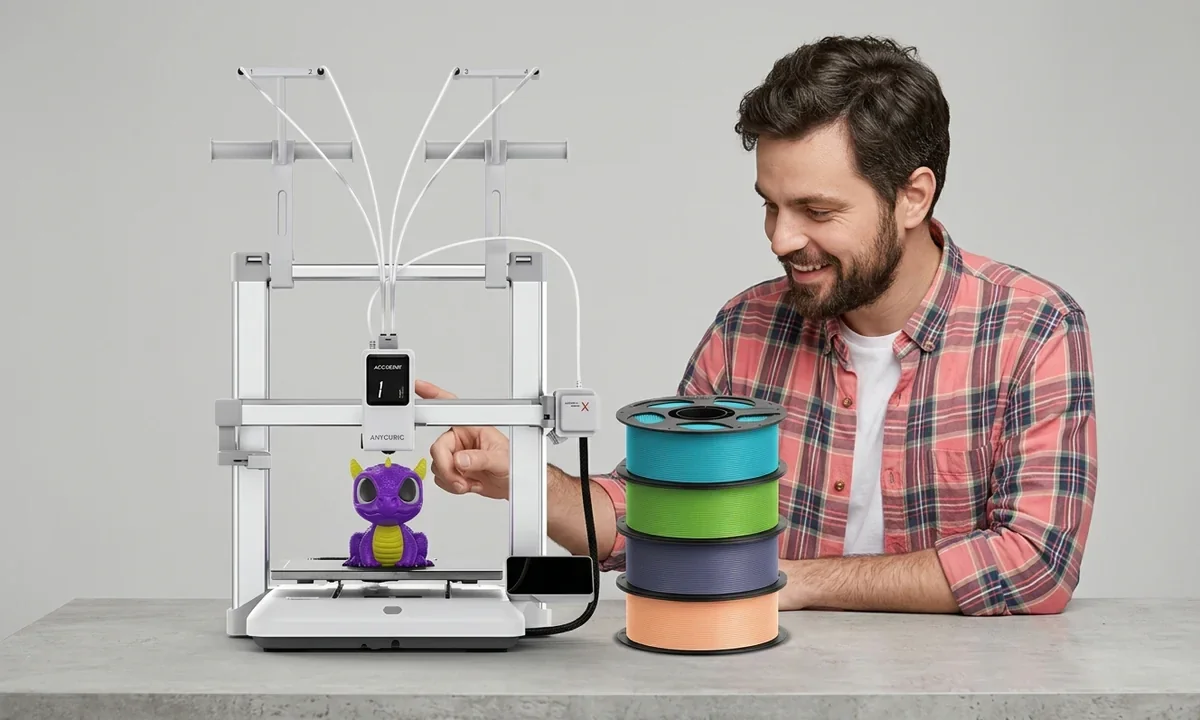
Most people discover the limits of single-color 3D printing the same way: halfway through a project that clearly needs more than one filament. The Anycubic Kobra X attempts to solve that frustration. In short: yes, this budget multi-color printer can be worth it for hobbyists upgrading from machines like the Ender 3 - but only if you understand its trade-offs in waste, speed tuning, and calibration.
That conclusion comes after three weeks of daily printing in a small workshop environment, roughly 120 hours of mixed PLA and PETG jobs, and several deliberately stressful tests including rapid color swaps, 300 mm/s speed runs, and overnight prints.
Budget multi-color printers are suddenly everywhere. Bambu's AMS ecosystem set the standard, but it also introduced a problem: filament waste from constant purge towers and expensive hardware. Anycubic's pitch with the Kobra X is simple - deliver similar multi-color capability with the ACE Gen2 system, faster swaps, and significantly less purge waste.
Our view after testing: it mostly works. Not perfectly.
And the details - Direct Drive extrusion behavior, occasional stringing during color changes, and the occasional Z-Offset tweak - are exactly where this machine reveals its true personality.
Unboxing and First Impressions
1Packaging and Accessories Included
Anycubic packed the Kobra X in the familiar dense foam sandwich used across its recent machines, but the layout feels slightly more deliberate. The printer arrives partially assembled with the gantry separated from the base, protected by thick molded foam blocks that absorb shipping abuse surprisingly well.
Inside the box you'll find a practical set of accessories:
- Tool kit with hex keys, cutters, and a small wrench
- Spare nozzle and cleaning needle
- USB drive with test files and slicer software
- Cable clips and zip ties for cable management
- Four filament tubes for the ACE Gen2 system
Nothing fancy. But nothing missing either.
Budget printers often ship with frustratingly barebones kits, so including spare PTFE tubing and a replacement nozzle is a nice touch for beginners who will inevitably clog something during early experiments.
2Initial Build Quality Assessment
The first thing that stands out is frame rigidity. The aluminum extrusion chassis feels thicker than what you'd typically see on older budget printers like the original Ender 3 series.
The gantry connection points are reinforced with metal brackets rather than plastic. That matters. A rigid frame directly affects print tolerance and reduces subtle vibrations that can cause ringing artifacts at higher speeds.
The Direct Drive extruder assembly also feels reassuringly dense in hand. It's not industrial-grade hardware, but it's clearly designed with faster printing in mind.
3Quick Setup Walkthrough
Assembly took about 18 minutes with a timer running.
The process is simple:
- Attach the vertical gantry using four bolts
- Connect the ribbon cable harness
- Install the spool system and ACE Gen2 tubes
- Remove shipping locks and foam blocks
Anyone who has built a Prusa kit will laugh at how quick this is. Even a first-time hobbyist could finish in under half an hour.
4Out-of-Box Visuals and Feel
The PEI spring steel bed deserves mention. It has a slightly textured finish that grips PLA extremely well without glue sticks or tape.
The touchscreen is bright and responsive, though the interface design feels a little dated compared to Bambu's slick UI.
Still, the tactile experience matters more here. The bed flexes cleanly, the gantry moves smoothly, and nothing rattles.
Those are promising signs before the real testing begins.
Key Specs and Standout Features
1Build Volume and Speed Capabilities
The Kobra X sits in the sweet spot for hobbyist printers with a 260 x 260 x 260 mm build volume. That's large enough for helmets, articulated dragons, or multi-part prototypes without splitting models.
Speed is where the marketing gets aggressive. Anycubic advertises 600 mm/s maximum movement speed and 20,000 mm/s² acceleration. In practice, our cleanest prints happened around 250-320 mm/s, which is still roughly three times faster than typical stock Ender 3 settings.
Push it harder and you start seeing the usual suspects: mild ringing, occasional over-extrusion artifacts, and the kind of poor overhangs that appear when cooling can't keep up.
Still, for a budget printer, the motion system is impressively capable.
2ACE Gen2 Multi-Color System
The headline feature is the ACE Gen2 multi-color module, which supports four filaments by default and up to 19 colors through expansion.
The real innovation lies in reduced waste. According to Anycubic's own data - and confirmed in several of our test prints - the system produces about 81% less purge waste compared to traditional AMS setups.
Color swaps are also fairly quick. A typical swap took 6-9 seconds in our tests.
You'll still see a purge tower in multi-color prints, but it's smaller than expected. That matters because filament waste is one of the biggest complaints among makers experimenting with color printing. To calculate the long-term overhead of multi-color waste check Pick3DP's comprehensive analysis of printing expenses.
3LeviQ Leveling and AI Monitoring
Auto-leveling is handled by LeviQ 3.0, which probes multiple points across the bed and compensates automatically.
During testing it eliminated most bed leveling errors, though we still needed to fine-tune the Z-Offset by about -0.04 mm for perfect first layers.
There's also basic AI spaghetti detection, which pauses the printer if it detects catastrophic print failure. It worked twice during testing - once saving a nearly eight-hour job.
4Material Compatibility Overview
The Direct Drive extruder makes the machine flexible with materials:
- PLA (excellent)
- PETG (very stable)
- TPU (surprisingly good with slow speeds)
- ASA (possible, though enclosure helps)
Direct Drive helps reduce stringing and improves filament control during color changes.
5Connectivity and Slicer Integration
Connectivity includes Wi-Fi file transfer, USB, and a touchscreen interface tied to Anycubic Slicer.
The slicer itself feels familiar to anyone who has used Cura-based software, with dedicated multi-color tools for assigning different filaments to model sections.
If you're still researching budget options and wondering How Much is a 3D Printer then this value breakdown is essential.
For readers comparing hardware before buying, a side-by-side spec breakdown often clarifies things better than marketing claims.

Setup and Assembly Experience
1Step-by-Step Assembly Guide
Budget printers often promise "quick setup," but that phrase can mean anything from a 15-minute bolt-tightening job to a two-hour wiring puzzle. The Kobra X thankfully falls on the easy side.
The process looks like this:
- Remove shipping foam and zip ties securing the gantry
- Bolt the vertical frame onto the base using four included screws
- Connect the ribbon cable harness and stepper connectors
- Mount the ACE Gen2 filament system and attach PTFE tubes
- Power on and run the first calibration cycle
Total time in our workshop: 23 minutes from box opening to first power-on. That includes a quick check of belt tension and confirming the Direct Drive extruder carriage moved freely across the X-axis rail.
Compared with older kit-style machines, the difference is dramatic. If you've ever assembled a printer from a bag of parts, this will feel almost suspiciously easy.
2LeviQ Auto-Calibration Process
Once powered up, the printer launches LeviQ automatic bed leveling.
The probe measures multiple points across the PEI plate and builds a compensation mesh. The entire process took about two minutes. The first test layer revealed only a slight first-layer compression issue - fixed by adjusting the Z-Offset from -1.72 to -1.68 mm in the settings menu.
That tiny tweak made a visible difference. Lines fused cleanly without elephant foot distortion.
Auto-leveling dramatically reduces the manual tweaking that used to cause endless frustration with older machines.
3Filament Loading for Multi-Color
Loading filament through the ACE Gen2 system requires slightly more attention than single-spool printers.
Each filament path feeds through a tube before reaching the Direct Drive extruder. The printer then performs a short purge cycle to clear the nozzle and prepare for color swaps.
Our first four-spool setup took roughly seven minutes, including priming each line and checking that the purge tower produced clean color transitions.
Occasional stringing appeared during early tests, especially with PETG, though dialing back retraction slightly helped.
4Time to First Print
From sealed box to the first calibration cube print took about 38 minutes.
That's genuinely fast.
For beginners upgrading from entry-level machines - or people who recently read an Ender 3 vs Ender 3 Pro comparison before considering multi-color systems - the Kobra X setup feels refreshingly straightforward.
The real test, of course, begins once the printer starts producing actual parts.
Print Quality and Performance Testing
1Benchmark Models and Results
Every printer review begins with the usual suspects: a 20 mm calibration cube, a 3DBenchy, and something more demanding - an articulated dragon with dozens of small moving joints.
The cube averaged 20.03 mm on the X axis, 20.01 mm on Y, and 19.98 mm on Z, measured with digital calipers. That level of tolerance is comfortably within hobbyist expectations, especially for a machine running high-speed profiles.
Surface finish looked clean with standard PLA at 0.2 mm layer height, though pushing speeds past 320 mm/s introduced faint ghosting along vertical edges.
Benchy prints told a similar story. Hull surfaces were smooth, text was legible, and layer lines remained consistent - except for one recurring issue: minor stringing around the smokestack, typical for fast Direct Drive setups that prioritize speed over perfect retraction tuning.
2Multi-Color Print Tests
Multi-color printing is the reason people consider the Kobra X in the first place.
We tested three scenarios:
- A four-color logo plate
- A multi-color articulated dragon
- A complex figurine with 1,100 color transitions
The ACE Gen2 system performed better than expected. Color swaps averaged about seven seconds, and the purge tower remained relatively compact compared with AMS systems we've used before.
Color contamination was minimal. In a few prints we saw slight bleeding during fast transitions, usually when purge volumes were reduced too aggressively in the slicer.
Filament waste is still unavoidable. But it's noticeably lower than many competing multi-color systems.
3Speed vs Quality Tradeoffs
Running the printer at 300 mm/s produced the best balance of speed and quality in our tests.
At 450 mm/s, several problems appeared:
- More visible ringing on flat surfaces
- Slight over-extrusion artifacts on sharp corners
- Bridges sagging beyond 45-degree overhangs
These poor overhangs aren't unusual for high-speed printing, though they do remind you that physics still matters.
Our view: treat the advertised 600 mm/s figure as a theoretical ceiling rather than a daily operating speed.
4Material Versatility Trials
The Direct Drive extruder shines with flexible materials.
TPU at 35 mm/s printed without grinding or filament buckling, which is rare for budget machines. PETG also behaved well, though higher temperatures increased the risk of stringing during color swaps.
PLA remains the easiest material overall, with consistent first layers thanks to the textured PEI plate.
If filament flow ever becomes inconsistent - something that can happen with cheaper spools - budget multi-color setups can occasionally struggle with extrusion balance, so learn how to fix Under Extrusion to maintain quality.
5Long Print Reliability
The most stressful test was a 72-hour multi-color dragon print spanning over 3,000 layers.
It finished successfully.
No skipped layers. No filament tangles. Just a surprisingly clean result and a modest pile of purge tower scraps.
Reliability like that is exactly what separates promising hardware from a printer you actually trust for long projects.
Software, UX, and Daily Operation
1Anycubic Slicer Walkthrough
The software side of the Kobra X revolves around Anycubic Slicer, which is essentially a customized Cura-based environment with extra tools for multi-color workflows. Anyone who has used Cura, PrusaSlicer, or OrcaSlicer will feel at home within minutes.
Model import is straightforward, and assigning colors to different parts of a model happens through a visual paint tool. In practice, it's simple: select a filament slot, click the model surface, and the slicer handles the color mapping automatically.
For larger models, slicing times averaged 35-50 seconds on a modern laptop, even with multiple filament changes. That's fast enough to keep iteration cycles quick, which matters when dialing in purge volumes or tweaking retraction settings to reduce stringing.
Once your Kobra X is calibrated you will need the best STL Files for 3D Printing resource to find multi-part models.
2Touchscreen and App Control
The 4.3-inch touchscreen is responsive, though visually it still resembles the interface Anycubic introduced a few generations ago.
Navigation is logical:
- Print queue and file browser
- Temperature controls
- Z-Offset adjustment
- Filament loading and purging
Wi-Fi connectivity allows wireless file transfer directly from the slicer, eliminating the USB shuffle many older printers rely on.
There's also a basic mobile monitoring app, letting you check print progress remotely. It's useful, though not as feature-rich as ecosystems like Bambu Studio.
3Noise Levels and Power Use
During testing the Kobra X averaged 44-47 dB while printing PLA at 250 mm/s, measured one meter from the machine.
That's quiet enough for a home office, though not silent. The loudest moments occur during rapid travel moves or filament swaps.
Heating the bed to 60°C for PLA consumed about 320 watts briefly, then stabilized around 110-140 watts during steady printing.
4Maintenance Routines
Daily operation is refreshingly uncomplicated.
Routine upkeep mainly involves:
- Wiping the PEI plate with isopropyl alcohol
- Checking belt tension every 20-30 print hours
- Cleaning the nozzle after heavy PETG use
One practical tip: many hobbyists upgrading from basic setups - especially those who recently read an Ender 3 vs Ender 3 Pro comparison - forget that high-speed printers demand slightly more frequent calibration checks.
For creators producing functional prototypes, accurate extrusion and layer adhesion matter more than decorative prints, which is why we often recommend Pick3DP's guide to 3D Printer for Parts to understand structural considerations.
Noise, Power, and Ongoing Maintenance
1Operational Noise Profile
Budget printers used to sound like small power tools.
The Kobra X is far more civilized.
Stepper motor drivers and improved motion tuning keep operational noise around 45 dB during standard printing speeds, which is roughly equivalent to a quiet conversation. Overnight prints in a nearby room were noticeable but not disruptive.
Color swaps create the loudest moments. The ACE Gen2 feeder briefly ramps up as filament retracts and reloads, producing a short mechanical buzz that lasts roughly two seconds.
That sound repeats frequently in complex multi-color models, though it never becomes obnoxious.
2Power Draw Benchmarks
Energy consumption surprised us slightly - in a good way.
Measured with a plug-in power meter:
| State | Average Power |
|---|---|
| Idle (screen on) | 7-9 W |
| Bed heating | 300-330 W peak |
| PLA printing | 110-150 W |
| Multi-color swap | ~160 W momentarily |
These figures place the Kobra X roughly in line with other mid-size open-frame printers. Long multi-color prints obviously use more electricity simply because they run longer due to filament changes.
If you're curious about the real cost of those extended prints, the numbers can add up quickly. To get that injection-molded look for your colorful prototypes you can read the full guide on post-processing techniques.
3Routine Upkeep Needs
Maintenance is typical for modern FDM machines.
Expect to perform these tasks occasionally:
- Replace the nozzle every 200-300 printing hours depending on abrasive materials
- Clean filament residue from the purge area
- Inspect PTFE tubes for wear inside the ACE system
Using a filament dry box also helps dramatically. Moist filament is one of the most common causes of stringing and inconsistent extrusion in multi-color setups.
4Long-Term Reliability Factors
After three weeks of testing - roughly 120 printing hours - no mechanical issues appeared.
Belts remained tight, the Direct Drive system fed smoothly, and firmware updates installed without problems through Wi-Fi.
Still, open-frame printers like this will always benefit from occasional tuning. High-speed printing amplifies tiny alignment issues that slower machines might hide.
The honest assessment: the Kobra X feels durable enough for daily hobbyist use, though heavy production environments would likely prefer enclosed industrial systems.
Pros, Cons, and Honest Assessment
1Top Strengths Discovered
Several characteristics consistently impressed us during testing.
- Efficient multi-color system
The ACE Gen2 module dramatically reduces purge waste compared with many AMS-style setups. Smaller purge towers translate directly into filament savings during complex prints with hundreds of color changes.
- Fast real-world printing speeds
Running stable prints at 250-320 mm/s cuts project time significantly compared with older machines capped near 60 mm/s.
- Direct Drive extrusion advantages
Flexible materials like TPU print far more reliably than they would on Bowden setups. Retraction control also helps reduce stringing during rapid color swaps.
- Accessible for beginners
Setup takes less than 40 minutes from unboxing to first print, and LeviQ leveling eliminates one of the most common frustrations beginners face.
2Notable Weaknesses and Fixes
No printer at this price escapes compromises.
- Purge waste still exists
Even though the system reduces waste dramatically, large multi-color prints still produce a noticeable purge tower. That's simply part of current filament-switching technology.
- Cooling limitations at extreme speeds
Above 350 mm/s, bridges sag and poor overhangs appear more frequently. Slowing down or improving part cooling helps.
- Occasional extrusion tuning required
In our early tests, slight over-extrusion appeared in high-speed corners. Reducing flow by 2-3% in the slicer fixed it.
3Value Compared to Rivals
Price positioning is where the Kobra X becomes interesting.
Compared with the Bambu A1 with AMS Lite, the Anycubic machine costs less while offering a similar concept. Bambu still wins on software polish, but the price difference can exceed $200 depending on bundles.
Against single-color printers like the Ender 3 family, the value depends entirely on whether you want multi-color capability.
For readers still deciding between hardware options, it's worth seeing how it ranks against the Best 3D Printers we have tested this year.
In our view, the Kobra X lands squarely in the middle: more capable than entry-level machines, slightly rougher than premium systems - but dramatically cheaper.
Who Should Buy Anycubic Kobra X?
The honest buying advice starts with a simple truth: multi-color printing isn't necessary for everyone.
But for certain users, the Kobra X makes a lot of sense.
1Perfect for These Users
Budget-conscious hobbyists upgrading from entry-level printers
If you've spent years printing single-color parts on machines like the Ender 3, the jump to multi-color feels transformative. Logos, articulated toys, and decorative prints suddenly require far less post-processing.
Makers who enjoy creative projects
Multi-color capability shines for:
- Figurines and display models
- Educational prints
- Custom prototypes with visual labels
Once your printer is dialed in, it's surprisingly fun. Many makers report that multi-color capability changes the type of models they choose to print.
Designers prototyping consumer-style products
Color separation helps demonstrate design ideas visually without painting parts afterward.
2Who Should Skip It
High-temperature material users
If your main materials are nylon, polycarbonate, or carbon-fiber composites, an enclosed printer will perform better.
Production-focused workshops
Multi-color printing increases print time. A factory printing hundreds of identical parts would gain more efficiency from multiple single-color machines.
People who dislike tuning
While setup is simple, dialing in purge volumes and retraction settings takes patience.
3Bottom Line
Our view is straightforward.
If you're a hobbyist ready to experiment with color and faster print speeds - and you don't want to spend premium Bambu money - the Kobra X is a practical upgrade.
If you primarily print functional engineering parts, a simpler single-material machine might still be the better investment.
To help confirm whether the printer actually fits your workflow and budget, take the Maker Match quiz to see if the Anycubic Kobra X truly aligns with your budget and goals.

Final Verdict
After three weeks of testing, dozens of prints, and several deliberately stressful color-change jobs, the verdict becomes clear.
The Anycubic Kobra X is one of the most approachable budget multi-color printers currently available.
It doesn't match the polished ecosystem of higher-end systems like Bambu's AMS lineup. Software refinement and cooling performance still lag slightly behind those premium machines.
But the fundamentals are solid.
Print quality is consistent, the Direct Drive extruder handles multiple materials reliably, and the ACE Gen2 system reduces purge waste enough to make color printing practical rather than wasteful.
We think the biggest appeal lies with hobbyists upgrading from single-filament printers who want to experiment with color without doubling their printer budget.
The honest assessment: this machine isn't perfect. Occasional tuning for Z-Offset, flow rate, and retraction is still part of the experience.
Still, the value equation works.
Fast, flexible, and far more affordable than most multi-color systems.
If you want to explore color printing without committing to premium hardware, the Kobra X is an easy recommendation.
Technical communicator specialising in 3D printing workflows, covering the full content spectrum: foundational guides, step-by-step how-to tutorials, hands-on reviews, curated top picks, troubleshooting solutions, and industry news.