
3D Printer Parts: Complete List of 3D Printing Components

Dive into the world of 3D printing with our comprehensive guide to 3D printer parts. Designed for intermediate hobbyists and engineering students, this article outlines the essential components that make up a 3D printer. Whether you're looking to upgrade your current setup, troubleshoot issues, or simply expand your knowledge, our detailed list provides the insights you need to succeed in the ever-evolving field of 3D printing.
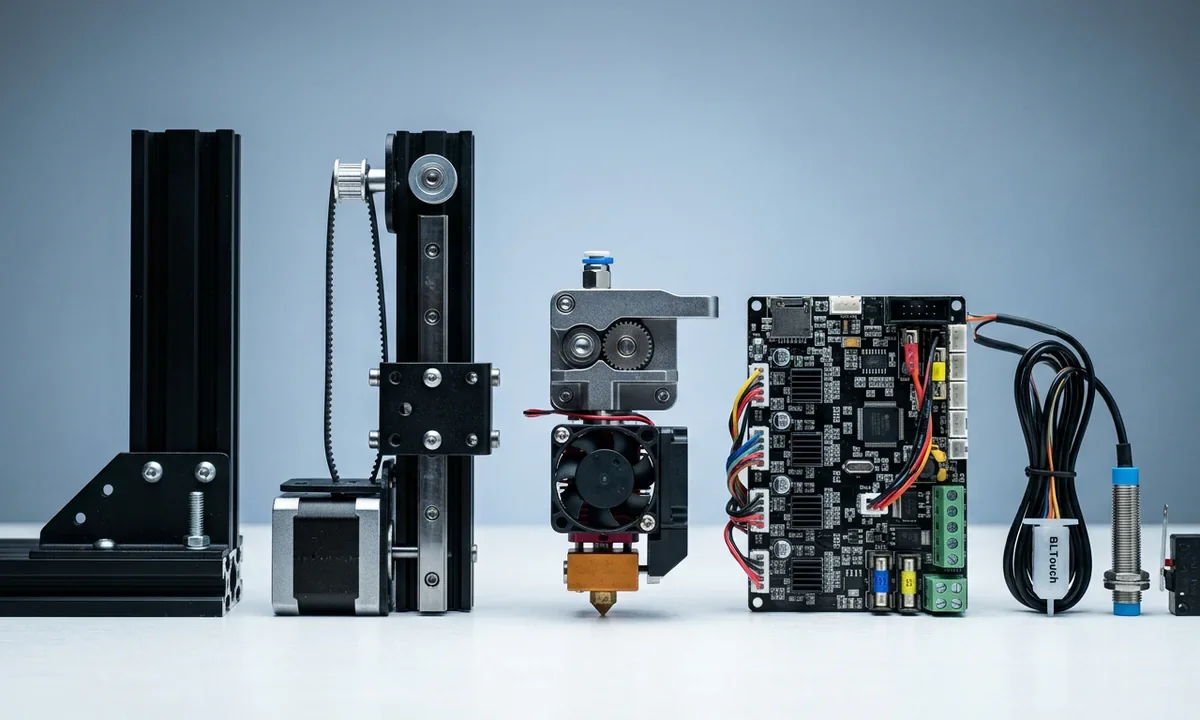
Back in the early RepRap days, hobbyists were building machines out of threaded rods, hacked-together electronics, and surplus PC parts. A decade later, names like Prusa MK4 ($1,099), Creality Ender 3 V3 KE ($299), and Bambu Lab X1 Carbon ($1,449) dominate reviews.
Prices dropped, reliability went up, but under the plastic shells the fundamentals haven't changed. A 3D printer is still a bundle of mechanical, electronic, and thermal components that need to work in harmony. And when one fails - a warped bed, a burnt stepper driver, or a clogged nozzle - you learn quickly why knowing each piece matters.
Frame and Structural Components
The frame is the skeleton. A cheap acrylic frame flexes under vibration, which is why most mid-range printers switched to aluminum extrusions. Even within aluminum there's debate: 2020 vs 2040 profiles, with wider beams adding stability but also weight. The print bed is usually aluminum, sometimes glass-coated for better adhesion.
Heated beds run from 60°C for PLA to 110°C for ABS; higher-end printers use PEI-coated spring steel sheets you can bend to pop parts off. Enclosures aren't just for looks. Try printing ABS on an open Ender 3 and watch it warp; do the same inside a Prusa enclosure and the difference is night and day.
Photo by ALL3DP
| Component | Description | Examples / Notes |
|---|---|---|
| Frame | The skeleton that holds all printer parts together; stability depends on material and design. | Acrylic (flexes), Aluminum extrusion (2020/2040), Steel (rigid but heavy) |
| Build Plate (Print Bed) | Surface where prints are formed; may be heated for adhesion and warping control. | Glass, Aluminum, PEI-coated spring steel sheets |
| Heated Bed | Maintains surface temperature to improve filament adhesion and reduce warping. | 60°C for PLA, up to 110°C for ABS |
| Print Surface / Coating | Detachable or permanent layer on top of the bed that affects adhesion and removal. | Magnetic build plates, BuildTak, Kapton tape |
| Enclosure (optional) | Protects prints from drafts and stabilizes chamber temperature. | Essential for ABS, Nylon; optional for PLA, PETG |
Motion System
Movement in 3D printers has always been a balancing act between speed and precision. Stepper motors, typically NEMA 17s, drive motion in tiny increments - 200 steps per rotation, microstepped down to fractions. Belts and pulleys dominate X and Y because they're fast and cheap, but they stretch over time.
You'll see users on Reddit swapping GT2 belts every six months. Z-axes rely on lead screws; cheaper machines use single-screw lifts that wobble, while Bambu Lab uses dual Z with sync belts for smoother motion. Linear rods are fine for entry models, but once you try a Voron with linear rails, you'll notice the glide. It's the difference between a bicycle with squeaky bearings and one that just hums along.
| Component | Description | Examples / Notes |
|---|---|---|
| Stepper Motors | Provide precise motion control by moving in small increments. | NEMA 17 (most common), NEMA 23 (larger, more torque) |
| Belts & Pulleys | Enable fast and lightweight movement on X and Y axes. | GT2 belts, aluminum pulleys; belts stretch and need replacing |
| Lead Screws | Control vertical (Z-axis) movement with accuracy but slower speed. | Single Z-screw (budget), Dual Z with sync belt (high-end) |
| Linear Rods | Guide moving parts smoothly along an axis. | Chrome rods with LM8UU bearings (basic setups) |
| Linear Rails | High-precision motion system offering better rigidity and smoother travel. | MGN12, MGN15 rails; used in Voron, Bambu Lab printers |
Extrusion System
Here's where the magic happens. The extruder has two halves: cold end and hot end. The cold end pushes filament using gears - Bondtech dual-drive gears are considered the gold standard. Direct drive setups (filament fed straight into the hot end) handle flexible filaments like TPU beautifully. Bowden systems are lighter on the carriage but struggle with retractions.
Source: pick3dprinter.com
The hot end contains the heater block, thermistor, and nozzle. A brass nozzle is fine for PLA, but abrasive filaments like carbon fiber chew through them in hours. That's why hardened steel or ruby nozzles exist, though they trade thermal conductivity for durability. If you've ever cursed a jam mid-print, you know the heat break and cooling fan weren't doing their job.
| Component | Description | Examples / Notes |
|---|---|---|
| Cold End | The part that grips and pushes filament into the hot end. | Bondtech dual-drive gears, Creality stock extruder |
| Hot End | Melts filament and prepares it for extrusion through the nozzle. | E3D V6, Micro Swiss All-Metal, Revo hot ends |
| Nozzle | Determines extrusion width; wears out depending on material used. | Brass (PLA, PETG), Hardened steel (carbon fiber), Ruby (abrasives) |
| Heater Block | Houses the heater cartridge and thermistor to control melting temperature. | Standard aluminum block, Volcano (high-flow) |
| Heat Break | Prevents heat from traveling up into the cold end. | PTFE-lined (budget), All-metal (high-temp filaments) |
| Cooling Fan | Keeps the cold end cool and prevents jams caused by heat creep. | 4010 radial fans, 3010 axial fans |
| Extruder Setup | Method of feeding filament into the hot end. | Direct drive (better for TPU), Bowden (lighter, faster moves) |
Electronics and Control Board
The motherboard is the printer's nervous system. Early Ender boards were notorious for noisy A4988 stepper drivers, producing that angry buzz. Upgrading to TMC2209 drivers quieted machines to a whisper and added smoother motion.
Power supplies vary - some cheap ones are sketchy fire hazards, while Mean Well units have earned trust. Firmware like Marlin runs on most hobby boards, but newer machines push Klipper for faster print speeds.
It's not uncommon to see a DIYer flashing Klipper and suddenly doubling print speeds with input shaping. Wiring deserves respect too; bad crimping causes mysterious disconnects or worse, burnt connectors.
| Component | Description | Examples / Notes |
|---|---|---|
| Motherboard | The main control unit that coordinates all printer operations. | Creality 4.2.7 board, Duet 2 WiFi, BTT Octopus |
| Stepper Drivers | Control the current sent to stepper motors for smoother and quieter motion. | A4988 (noisy), TMC2208/TMC2209 (silent, smoother), TMC5160 (advanced) |
| Power Supply Unit | Converts AC power into stable DC voltages for the printer. | Generic 24V supplies, Mean Well PSU (trusted brand) |
| Display Interface | Allows users to interact with the printer's firmware. | Monochrome LCD screens, Color touchscreens |
| Wiring & Connectors | Deliver power and data between components; quality affects reliability. | XT60/XT90 connectors, ferrule crimps, silicone wires |
| Firmware | Software that runs the printer hardware and interprets G-code. | Marlin (open source), Klipper (fast), RepRapFirmware |
Sensors and Safety Components
Limit switches may look humble, but they prevent a printer from slamming into its own frame. Auto bed leveling sensors are a divisive topic. Purists say manual leveling teaches you the machine, but anyone who's spent an evening chasing paper thickness knows why BLTouch and inductive probes are beloved.

Thermistors sit inside heater blocks and heated beds, reading temperatures constantly. Failures here are dangerous - thermal runaway protection is non-negotiable.
Filament runout sensors save long prints, though cheap ones sometimes false-trigger. Safety isn't just a checkbox; printers have caught fire when firmware protections were disabled. Communities like r/3Dprinting hammer this point: don't cheap out here.
| Component | Description | Examples / Notes |
|---|---|---|
| Endstops / Limit Switches | Detect when an axis reaches its home or maximum position. | Mechanical switches, Optical endstops, Hall-effect sensors |
| Auto Bed Leveling Sensor | Measures bed distance to ensure consistent first layer height. | BLTouch, Inductive probes, Capacitive sensors |
| Thermistors | Monitor temperatures of hot end and heated bed for stability and safety. | 100k NTC thermistors, PT100 or PT1000 sensors |
| Filament Runout Sensor | Pauses printing when filament breaks or runs out. | Basic microswitch type, Optical filament sensor |
| Thermal Fuses / Cutoffs | Provide safety by shutting down heating if temperatures get too high. | One-shot thermal fuses, Resettable thermal cutoffs |
| Chamber / Environment Sensors | Measure and control conditions in enclosed printers. | Temperature & humidity sensors, VOC sensors (for safety monitoring) |
User Interface
Interfaces range from rotary knobs with 128x64 pixel screens to full-color touch panels. The Prusa MK3S+ still ships with a simple monochrome display, while budget printers now sport flashy touchscreens.
Connectivity matters too. Some machines only accept SD cards, others have USB-C or even Wi-Fi. OctoPrint setups let you control printers remotely, though they add another layer of complexity.
Bambu Lab went a step further with cloud integration, letting you start prints from your phone. Handy, but not everyone trusts cloud reliance for mission-critical work.
| Component | Description | Examples / Notes |
|---|---|---|
| Display Screen | Shows print progress, settings, and menus for navigation. | 128x64 LCD (Prusa MK3S+), Full-color touchscreen (Creality Ender 5 S1) |
| Control Knob / Buttons | Used to navigate menus on non-touchscreen printers. | Rotary encoder knob, Basic push buttons |
| Touchscreen Panel | Allows direct interaction with printer settings and controls. | BTT TFT35, Creality touch display |
| File Input Ports | Provide ways to load print files into the printer. | SD card slot, MicroSD slot, USB Type-A/Type-C port |
| Wireless Options | Enable remote print management and monitoring. | Wi-Fi modules, Ethernet ports, Cloud control (Bambu Studio, OctoPrint) |
Cooling and Airflow
Cooling separates clean overhangs from sagging blobs. A part cooling fan blows directly at the freshly laid filament. More airflow isn't always better - PLA loves it, ABS hates it. Hot end cooling fans prevent heat creep, a common cause of jams in all-metal hot ends. Enclosed machines sometimes add chamber fans to stabilize temperatures. You'll find endless debates on forums about duct designs, with some makers swearing by Petsfang or Hero Me ducts. They're not wrong; directing airflow properly can improve print quality dramatically.
Filament and Feeding
The filament spool holder is deceptively important. Poor feeding angles cause tension, which shows up as inconsistent extrusion. PTFE tubing, especially Capricorn-branded, reduces friction and guides filament smoothly. For hygroscopic filaments like Nylon, dry storage is essential. Amazon reviews are full of users who discovered their expensive filament had gone brittle from moisture. Dry boxes with built-in heaters, like the eSUN eBox, keep filaments usable. Without one, you'll end up baking spools in your oven - ask any old-timer, it's a rite of passage.
Software and Firmware
The printer only listens to G-code, and slicer software writes that language. Cura is free and ubiquitous, PrusaSlicer has fanatical users, and Simplify3D once had a cult following before stagnating. Firmware choices also shape performance. Marlin dominates open-source machines, but Klipper with input shaping has made Creality and Voron owners rethink speed limits. OctoPrint extends control with plugins, letting you monitor temps, webcam feeds, or even power-cycle printers. And then there's the human element: a well-tuned slicer profile can make a $300 Ender print like a $1,000 machine.
Optional Add-Ons and Upgrades
Once you fall into the rabbit hole, upgrades are inevitable. Dual extruders allow two colors or dissolvable supports, though they complicate setup. Cameras help remote monitoring, especially paired with OctoPrint. Hardened nozzles are must-haves for exotic filaments. Laser engraver modules bolt onto some printers, though results are mediocre compared to dedicated machines. The real upgrade culture thrives in DIY builds like the Voron project, where makers swap in CoreXY motion systems, high-flow hot ends, and magnetic flex plates. You'll see countless YouTube channels showing builds that cost more than commercial machines - but the satisfaction is priceless.
Conclusion
Owning a 3D printer isn't just about pushing print and walking away. It's about knowing what each part does, why it fails, and when to upgrade. Want reliability for long prints? Invest in a quality power supply and auto bed leveling. Want to print exotic filaments? Swap brass nozzles for hardened steel and add an enclosure. If you're chasing speed, Klipper firmware and linear rails will get you there, though at the cost of tinkering. For beginners, the best advice is simple: learn your machine's anatomy. Each creak, hum, and whirr tells you something. Ignore it, and you'll waste time and filament. Understand it, and you'll unlock the real joy of 3D printing - building things that actually work.
Technical communicator specialising in 3D printing workflows, covering the full content spectrum: foundational guides, step-by-step how-to tutorials, hands-on reviews, curated top picks, troubleshooting solutions, and industry news.
Free Downloads
Loading...

3D Printer Maintenance Schedule Template
Customizable maintenance schedule template to keep your 3D printer in perfect condition and extend its lifespan.
3D Printer Components Checklist
Complete printable checklist of essential 3D printer parts and components for maintenance and upgrades.