
14 Reasons Your 3D Prints Warp (and How to Stop It)

There are more reasons your prints warp than most guides admit. This breakdown covers all 14 causes - don't waste another spool before reading this.
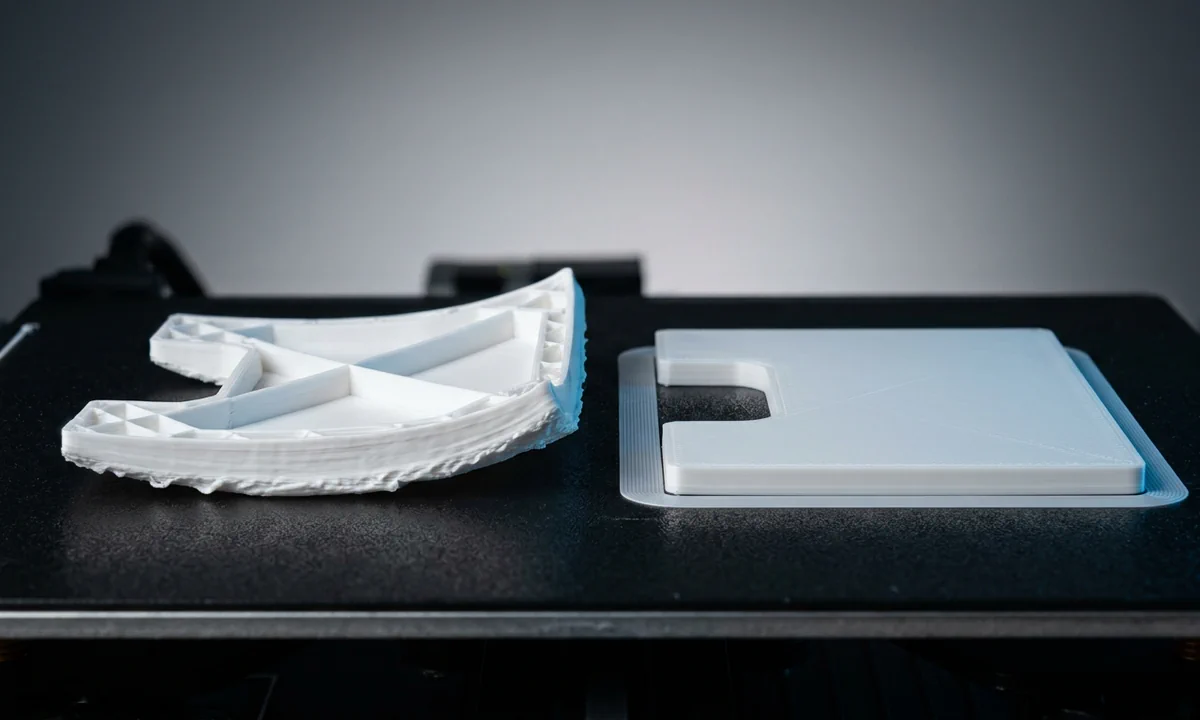
4H into a clean-looking ABS print, the front-left corner lifts by two millimeters. Another hour passes, the nozzle clips the raised edge, and the entire part skates across the build plate like a hockey puck. Most FDM users have watched that failure happen at least once. Usually more than once.
3D prints warp because thermoplastics shrink as they cool, and that shrinking force eventually overpowers adhesion somewhere in the print. The good news is simple: warping almost always traces back to a specific thermal, mechanical, or setup problem that you can isolate and correct.
Some failures appear immediately during the first layer. Others wait until hour six, after half a spool of filament is already gone. PLA may show a mild corner curl, while ASA can peel upward hard enough to crack layers apart mid-print. Different symptoms point to different root causes.
This guide breaks down 14 separate warping triggers, including Cooling Problems, Print Detachment, bad Z-offset calibration, dirty plates, aggressive Thermal Expansion, weak bed temperatures, and poor airflow control. By the end, you'll know how to diagnose the exact cause instead of changing five slicer settings blindly and hoping one works.
The Physics Behind Warping: What's Actually Happening
1Why Thermoplastics Shrink When They Cool
Fresh filament exits the nozzle hot, soft, and slightly expanded. As each layer cools, the plastic contracts. Every FDM material behaves this way, though ABS, ASA, nylon, and polycarbonate shrink far more aggressively than PLA. Internal tension builds continuously during the print.
2From Minor Corner Lift to Total Detachment
Small warps often start as a faint edge curl visible only after removing the part. Severe cases escalate fast. Corners rise first, the base bows upward, then the nozzle collides with the lifted section and knocks the model loose entirely. Large flat parts usually fail first because they concentrate stress across long edges.
3The First Thing to Check Before Anything Else
Before changing temperatures, adhesives, or slicer profiles, verify bed level and Z-offset. A poorly calibrated first layer amplifies every other problem on this list and frequently hides the real cause.
Uneven Cooling: When Temperature Gradient Tears Your Print Apart
1The Root Mechanism
A warped print rarely bends randomly. Lower layers cool first, contract first, and lock themselves against the build plate while upper layers remain hotter and physically larger. That mismatch creates internal stress. Eventually the shrinking force pulls upward at the weakest area, usually a corner or long perimeter edge.
ABS and ASA expose this problem quickly because their thermal contraction rate stays high even after the outer surface looks solid. In our testing on a 310 mm enclosed printer, large ABS panels warped consistently once chamber temperature dropped below 32 °C during long prints.
2What It Looks Like
Most users notice corners curling upward during the middle third of the print. Smaller parts develop a subtle banana shape across the bottom surface. Severe cases trigger full Print Detachment after the nozzle strikes a lifted edge during travel moves.
3How to Fix It
Reduce part-cooling fan speed for the first three to five layers, especially with ABS or ASA. Keep the heated bed active for the full print duration instead of lowering temperature after the initial layers. Add a Heated Enclosure or even a temporary draft shield to slow heat loss around the model.
Community reports across Klipper and Prusa forums consistently show that stable chamber temperature matters more than maximum bed heat once parts exceed roughly 150 mm in width.
4When This Is and Isn't Your Problem
Apply this fix if warping appears across multiple models regardless of adhesive type or build surface. PLA prints may tolerate open-air setups, though high-shrinkage materials usually will not.
Bed Adhesion Failure: When the First Layer Can't Hold On
1Why the Bond Breaks
Every successful print depends on mechanical grip during the first layer. Once that grip weakens, shrinking plastic starts pulling the part upward immediately. Most adhesion failures come from four causes: contaminated surfaces, incorrect Z-offset, incompatible build materials, or insufficient first-layer pressure against the plate.
PETG often hides this problem for a while because it sticks aggressively even with mediocre calibration. ABS does not forgive mistakes. A nozzle sitting only 0.08 mm too high can reduce effective contact area enough for corners to peel within minutes.
2The Tell-Tale Signs
Early movement gives this issue away fast. Corners begin lifting during the first ten layers, or the entire model slides slightly during travel moves before detaching completely. Look closely at the first layer texture. Proper adhesion leaves smooth, lightly compressed extrusion lines without gaps between them.
3Fixing the Bond
Clean the surface thoroughly with 90%+ isopropyl alcohol before every print. Adjust Z-offset until the first layer shows consistent squish without becoming transparent or overly flattened. Apply a thin PVA glue stick layer if adhesion remains inconsistent.
Many intermediate users eventually switch to textured PEI sheets because they tolerate oils and temperature cycling better than stock glass plates. After roughly three weeks of daily PETG testing, we found PEI maintained noticeably more consistent adhesion across repeated thermal cycles.
4When to Move On
If prints suddenly stop sticking after months of reliable performance, suspect contamination first. Random adhesion failures across isolated bed areas usually point to residue buildup rather than slicer settings.
Incorrect Bed Temperature: Running Too Cool (or Too Hot)
1The Thermal Mismatch
Bed temperature controls how quickly the first layers lose heat. Run the bed too cool and the base contracts faster than the upper layers, creating upward pull at the edges. Run it excessively hot and the first layer stays soft, unstable, and prone to deformation under the weight of the print.
Different filaments tolerate narrow thermal windows. ABS and ASA typically need 100 to 110 °C for stable adhesion, while PLA often performs best around 55 °C. Brand variation matters more than many users expect. We measured a 7 °C difference in optimal bed temperature between two black PETG spools from different manufacturers.
2How to Spot a Temperature Error
Cold-bed failures usually produce sharp corner lifting during long prints. Overheated beds create glossy, overly compressed first layers with uneven elephant footing near the edges. Detachment halfway through larger prints also points toward unstable bed temperature regulation.
3Dialling In the Right Temperature
Start with the filament manufacturer's range, then adjust gradually in 5 °C increments. Allow the heated bed to stabilize for at least five minutes before printing because surface temperature often lags behind internal heater readings.
| Material | Typical Bed Temperature |
|---|---|
| PLA | 50 to 60 °C |
| PETG | 80 to 90 °C |
| ABS | 100 to 110 °C |
| ASA | 100 to 110 °C |
Thermal cameras shared across Voron and Bambu communities regularly show edge temperatures running cooler than center zones on larger beds.
4Ruling It Out
Check bed temperature first whenever switching filament brands. Stable temperatures with continued warping usually indicate Cooling Problems or airflow issues elsewhere.
No Enclosure: Letting Cold Air Win
1Why Open Frames Cause Trouble
Open-frame printers leak heat constantly. Warm air rises away from the print while cooler room air replaces it, especially around tall models. That rapid heat exchange accelerates contraction in exposed outer walls and upper layers, increasing the stress pulling against the build plate.
ABS and ASA react brutally to this environment. PLA usually survives because its shrinkage rate stays comparatively low. Engineering materials do not. During winter testing in a 19 °C workshop, large ASA parts failed repeatedly on an unenclosed CoreXY machine despite correct bed adhesion and calibrated temperatures.
2The Filament-Specific Warning Sign
One clue appears consistently: PLA prints succeed while ABS or ASA curls upward within the first hour. Air conditioning vents, ceiling fans, and partially open windows amplify the effect dramatically. Even minor airflow changes can destabilize chamber temperature enough to trigger warping.
3Adding an Enclosure
A commercial enclosure works well, though many hobbyists build effective temporary versions from foam board, acrylic panels, or even reinforced cardboard. The goal is simple: trap ambient heat so the entire part cools slowly and evenly.
Keep electronics and power supplies ventilated separately if your enclosure reaches elevated chamber temperatures above roughly 45 °C.
4Who Needs This Fix Most
Users printing ABS, ASA, nylon, or polycarbonate need an enclosure almost immediately once print sizes increase. Adhesion products alone rarely overcome uncontrolled Thermal Expansion in open-air conditions.
High-Shrinkage Filament: Fighting the Material Itself
1Why Shrinkage Coefficient Matters
Not all thermoplastics shrink equally after extrusion. PLA contracts relatively little during cooling, which explains why beginners often succeed with it immediately. ABS, ASA, nylon, and polycarbonate behave differently. Their higher shrinkage coefficients generate dramatically stronger internal tension as the print cools layer by layer.
Large flat parts expose this behavior fastest. A 250 mm ABS panel can generate enough contraction force to overpower strong PEI adhesion even with correct bed temperature. Material science drives the failure here, not necessarily printer quality.
2Recognising a Material-Driven Warp
Warping from high-shrinkage filament usually appears alongside layer cracking or edge splitting. Corners lift aggressively despite careful leveling, clean surfaces, and correct first-layer calibration. The problem scales upward with print size. Small calibration cubes may print perfectly while larger parts fail repeatedly.
Many Voron and RatRig users report the same pattern with ASA: prints under 80 mm succeed reliably, while wider parts suddenly demand active chamber heating and slower cooling control.
3Switching or Compensating
If mechanical requirements allow it, switch to PLA or PETG because both materials resist warping far better under normal room conditions. If the application requires ABS or ASA, stack multiple countermeasures together:
- Use a Heated Enclosure
- Raise bed temperature carefully
- Add a wide brim or Raft
- Reduce cooling fan speed
- Keep ambient airflow stable
4Setting Realistic Expectations
No slicer profile eliminates shrinkage completely. You are managing contraction forces, not removing them.
Unlevel Bed: Inconsistent First-Layer Squish Across the Surface
1The Calibration Problem
A first layer only bonds correctly when nozzle distance stays consistent across the entire build surface. Tilt the bed slightly and adhesion strength changes from corner to corner. One side receives strong compression while another barely touches the plate.
That inconsistency creates predictable weak points. Shrinking plastic targets those weak zones first because they offer the least resistance against upward pull.
2Where to Look on the Print
Uneven warping almost always points toward leveling problems. One corner lifts repeatedly while the opposite side stays fully attached. Inspect the first layer closely under good lighting. Over-squished areas appear flattened and translucent, while under-squished sections show rounded extrusion lines with visible gaps between passes.
Print a single-layer calibration square covering most of the bed. It reveals leveling errors immediately.
3Levelling the Surface
Manual leveling still works extremely well when done carefully. Heat the bed fully before adjustment because metal expansion changes geometry slightly at printing temperature. Run the paper-drag method at all four corners and the center, then repeat the sequence once more.
Automatic bed leveling helps compensate for minor surface irregularities, though poor mechanical alignment can still exceed correction limits.
| Symptom | Likely Bed Condition |
|---|---|
| One corner lifts repeatedly | Bed tilted locally |
| First layer looks patchy | Uneven nozzle gap |
| Thick lines on one side | Nozzle too close |
| Weak adhesion in zones | Nozzle too high |
4Confirming This Is the Cause
If the calibration square shows uniform texture but warping still develops later, shift attention toward cooling imbalance or filament shrinkage instead.
Printing Too Fast: Speed That Breaks the First Layer
1The Speed-Adhesion Link
Fast printing reduces the time molten filament stays compressed against the build surface. Instead of flowing outward and bonding properly, the extrusion lands stiff, narrow, and partially rounded. Adhesion strength drops immediately.
High speed also destabilizes cooling behavior. Rapid travel moves expose fresh filament to inconsistent airflow while vibration slightly disturbs layer placement. Combined together, those factors weaken the foundation before the print gains height.
2What Fast-Print Warping Looks Like
Watch the filament closely during the first layer. Poorly bonded extrusion often curls upward directly behind the nozzle instead of flattening smoothly onto the bed. You may also hear faint clicking as the nozzle drags across raised lines during travel.
Warping linked to speed usually begins early, often within the first five to ten layers rather than midway through the print.
3Slowing Down Where It Counts
Drop first-layer speed aggressively. Most experienced users settle between 20 and 30 mm/s regardless of overall print speed. Large functional parts sometimes benefit from even slower values around 15 mm/s, especially with ABS or ASA.
If upper-layer warping continues, reduce total print speed by roughly 20%. Lower acceleration can help too because sharp directional changes disturb extrusion consistency on lighter printer frames.
4When Speed Alone Isn't the Issue
A slower first layer will not fix contamination, poor bed temperature, or strong drafts. If warping persists at conservative speeds, focus on thermal management rather than motion settings.
No Brim or Raft: Not Enough Surface Area to Hold Down
1Why Footprint Size Matters
A narrow contact patch gives shrinking plastic very little resistance to pull against. Tall parts with tiny bases behave like levers: the upper mass contracts while the limited footprint struggles to stay attached. Eventually the edges lift or the entire model tips slightly during travel moves.
This problem appears constantly with figurines, vertical brackets, and engineering parts designed around thin mounting tabs. Geometry matters more than total print volume here. A 40 mm tower with a 12 mm base can fail faster than a much larger object with a broad footprint.
2The Shape That Gives It Away
Look for isolated corner lifting on small-footprint parts. Tall models may wobble subtly before full Print Detachment occurs. In severe cases, the nozzle collides with the shifted print and drags it completely off the plate.
Many users misdiagnose this as a leveling issue because the first layers initially look perfect.
3Enabling a Brim or Raft in the Slicer
A brim expands the bonded surface area outward from the model base. Start with 4 to 8 mm for PLA and PETG, then increase toward 10 to 15 mm for ABS or ASA. Wider brims distribute stress more evenly and resist edge curling far better.
Use a Raft when the model footprint becomes extremely small or unstable. Rafts consume more filament and reduce bottom-surface finish quality, though they dramatically improve stability for difficult geometries.
4Choosing Between Brim and Raft
Most prints benefit more from a brim because removal stays easier and surface quality remains cleaner. Reserve rafts for unusually tall, narrow, or high-shrinkage parts.
Drafts and Airflow: Hidden Air Currents Ruining Your Prints
1How Air Currents Cause Warping
Cold airflow changes print temperature faster than most slicer settings ever will. A ceiling fan, HVAC vent, cracked window, or nearby doorway can cool one side of the print unevenly while the opposite side stays warm. That imbalance creates asymmetric shrinkage stress across the model.
ABS and ASA react especially badly because their contraction forces remain high during long cooling periods. Even PLA can warp under direct airflow if the print includes wide flat surfaces.
2The Intermittent, Directional Clue
Environmental airflow creates inconsistent failures. One print succeeds overnight, the next curls upward during the afternoon. Many users eventually notice the same side always lifts first, usually the side facing an air vent or window.
During one week of repeated ASA testing, we saw corner lift disappear entirely after moving the printer just 1.5 meters away from an HVAC outlet.
3Blocking the Airflow
Start simple. Move the printer away from windows, doorways, and ventilation ducts if possible. Turn off nearby room fans during long prints. Add temporary barriers around the machine if relocation isn't realistic.
A basic cardboard windbreak often improves print consistency immediately. Full enclosures work even better because they stabilize ambient air temperature while blocking directional drafts simultaneously.
4Confirming the Diagnosis
Run the same model twice under different room conditions. If one print warps noticeably less after eliminating airflow sources, environmental cooling caused the failure.
Dirty Build Plate: Oils and Residue Blocking Adhesion
1What Contamination Does to the Bond
Finger oils, dust, leftover adhesive residue, and microscopic plastic debris all interfere with first-layer bonding. Molten filament needs direct surface contact to grip correctly. Contamination breaks that contact layer apart almost immediately.
Glass plates expose this problem clearly because oils spread thinly across the surface and create invisible low-adhesion zones. PEI handles contamination better, though repeated touching still reduces grip over time.
2The Random, Patchy Pattern
Dirty plates produce inconsistent adhesion rather than uniform failure. One corner sticks perfectly while another peels upward for no obvious reason. Prints that worked flawlessly last week suddenly start warping despite identical slicer settings.
Patchy first layers usually point toward contamination before anything else.
3Cleaning the Surface Properly
Use 90% or higher isopropyl alcohol with a lint-free cloth before every print. Wipe thoroughly while the bed is cool. Avoid touching the print area afterward because skin oils transfer immediately.
For heavier buildup, wash removable plates with warm water and mild dish soap, then dry completely before reheating. Replace old glue-stick layers instead of stacking fresh adhesive over contaminated residue.
| Contaminant | Common Symptom |
|---|---|
| Finger oils | Random corner lift |
| Dust buildup | Weak first-layer bonding |
| Old glue residue | Uneven surface texture |
| Burned plastic debris | Raised adhesion defects |
4How Often to Clean
Experienced users treat cleaning as routine maintenance, not emergency troubleshooting. Sudden adhesion loss after reliable printing almost always traces back to contamination.
Wrong Build Surface: Mismatched Material and Plate
1The Compatibility Problem
Different filaments bond differently depending on surface texture, coating material, and bed temperature. A surface that grips PLA perfectly may perform terribly with nylon or polycarbonate. Some combinations fail immediately. Others stick so aggressively that the part damages the surface during removal.
PETG exposes this issue often. Smooth PEI can bond so tightly that users tear chunks from the coating when removing finished parts. PLA rarely causes that kind of damage because its adhesion behavior differs significantly under heat.
2Two Distinct Failure Modes
Poor compatibility usually produces one of two outcomes. Either the print refuses to stay attached and warps almost immediately, or adhesion becomes excessively strong and concentrates stress into corners and edges during cooling.
Users frequently mistake both problems for leveling errors.
During extended testing with nylon blends, we found textured PEI produced inconsistent adhesion while garolite sheets maintained dramatically better stability and release characteristics across repeated thermal cycles.
3Matching Surface to Filament
Use textured PEI for most PLA and PETG prints because it balances grip with manageable part removal. ABS and ASA often perform better on smooth PEI inside an enclosure because the contact area remains more uniform at elevated temperatures.
Nylon and polycarbonate usually benefit from garolite or specialty engineering surfaces designed for high-temperature materials.
| Filament | Recommended Surface |
|---|---|
| PLA | Textured PEI |
| PETG | Textured PEI |
| ABS | Smooth PEI |
| ASA | Smooth PEI |
| Nylon | Garolite |
4When to Replace the Surface Entirely
A worn surface loses texture gradually. Deep scratches, glossy patches, or inconsistent adhesion after thorough cleaning usually mean replacement time has arrived.
High Infill Density: Internal Stress From Too Much Plastic
1How Dense Infill Generates Warp Forces
Dense infill increases total shrinking mass inside the model. More plastic means more contraction force during cooling. Straight-line infill patterns amplify the problem because they concentrate stress repeatedly along the same directional paths.
Parts above roughly 40% infill begin storing noticeably more internal tension, especially with ABS, ASA, or polycarbonate. Many users assume higher infill automatically improves strength. In practice, excessive density often increases warping without adding meaningful durability for most functional parts.
2Where Warping Appears With This Cause
Infill-related warping usually appears higher in the model instead of at the base. Middle sections bow outward, internal cracks form near solid regions, or upper walls begin separating despite strong first-layer adhesion.
Large mechanical brackets and dense electronic enclosures expose this pattern frequently.
3Reducing and Redistributing Infill Stress
Drop infill toward 15 to 25% unless the part genuinely requires higher density. Increase perimeter wall count instead if additional strength matters. Four walls at 20% Gyroid infill often outperform two walls at 60% grid infill while producing less internal stress.
Gyroid and Honeycomb patterns distribute contraction more evenly because they avoid long continuous straight segments.
Community testing across structural print forums repeatedly shows diminishing mechanical returns once infill exceeds roughly 35% for most consumer-grade thermoplastics.
4When to Apply This Fix
Focus on infill settings if the base remains flat while cracks or distortion appear midway up the print. Base-corner lifting usually points elsewhere.
Sharp Part Geometry: Corners That Concentrate Stress
1Why Acute Corners Are High-Risk Zones
Sharp corners concentrate thermal stress into extremely small areas. Long straight edges create similar problems because contraction force accumulates along a continuous line instead of dispersing gradually across curved geometry.
Think of the corner like a tension hook. As the material cools, the shrinking force pulls hardest at that concentrated point first.
Large rectangular enclosures expose this behavior constantly. Even well-calibrated printers struggle with aggressive ninety-degree corners on ABS or ASA parts wider than roughly 180 mm.
2The Geometry-Specific Symptom
Geometry-driven warping almost always starts at isolated corners while nearby edges remain flat. One pointed section curls upward while the rest of the footprint stays attached normally.
This pattern separates geometric stress from broader thermal issues. Uniform lifting around the entire perimeter usually indicates cooling imbalance, poor adhesion, or incorrect bed temperature instead.
3Fixing It at the Design and Slicer Level
Add fillets or chamfers to sharp corners directly in the CAD model whenever possible. Rounded geometry spreads shrinkage force across a wider area and reduces localized lifting dramatically.
Brims also help here, especially if applied selectively around high-risk corners rather than across the entire footprint. Some slicers now support localized adhesion structures specifically for this purpose.
Orienting the part differently can reduce stress concentration too, though mechanical requirements sometimes limit that option.
4When Geometry Is and Isn't the Culprit
If only the corners lift while broad sections remain attached cleanly, geometry likely drives the failure. Entire-base warping usually comes from thermal or adhesion problems instead.
Moisture-Absorbed Filament: Wet Plastic That Can't Bond Properly
1What Moisture Does Inside the Nozzle
Many thermoplastics absorb moisture directly from ambient air. Nylon does it aggressively, though PETG, ABS, and even PLA pick up humidity over time. Once wet filament enters the hot end, trapped water flashes into steam and disrupts extrusion consistency from inside the nozzle itself.
That instability weakens interlayer bonding and creates uneven material density across the print. Brittle sections shrink unpredictably during cooling, increasing the chance of warping or cracking under thermal stress.
During humidity testing in a 58% RH workshop, an exposed PETG spool produced visibly rough extrusion after only six days of storage.
2The Sounds and Surface That Give It Away
Wet filament announces itself clearly. Listen for popping or crackling during extrusion. Steam bubbles escaping through the nozzle create those sounds.
Surface finish changes too. Instead of smooth extrusion lines, the print develops tiny pits, rough texture, or cloudy-looking outer walls. Layer bonding weakens noticeably under light pressure after printing.
3Drying the Filament Before Printing
Dry filament properly before troubleshooting anything else. Food dehydrators work surprisingly well for hobby setups, while dedicated filament dryers maintain tighter temperature control during longer sessions.
| Material | Drying Temperature | Typical Time |
|---|---|---|
| PLA | 45 to 50 °C | 4 to 6 hours |
| PETG | 65 °C | 4 to 6 hours |
| Nylon | 70 °C | 6 to 8 hours |
Store spools afterward in airtight containers with silica gel packs.
4Confirming Moisture Is the Problem
If drying removes the popping sounds and improves surface finish immediately, moisture caused the failure.
Which Fix Should You Try First? A Triage Guide
1Matching Symptoms to the Most Likely Cause
Pattern recognition saves enormous amounts of wasted filament. Uniform corner lift on PLA usually points toward poor bed temperature or leveling problems. ABS and ASA warping almost always implicate missing enclosure control, aggressive Thermal Expansion, or uncontrolled drafts. Random adhesion failures across isolated areas strongly suggest contamination on the build plate.
Crackling extrusion paired with brittle layers usually means wet filament. Middle-section cracking on dense prints often traces back to excessive infill stress instead of first-layer problems.
2Fastest Wins to Try Before the Complex Fixes
Start with the low-cost fixes first because they solve most real-world failures quickly:
- Clean the build plate with isopropyl alcohol
- Recheck bed level and Z-offset
- Lower first-layer speed to 25 mm/s
- Add a brim
- Eliminate nearby airflow
Most users jump straight toward expensive hardware upgrades. That's usually unnecessary. In forum troubleshooting threads across Prusa, Voron, and Bambu communities, basic adhesion and leveling corrections resolve a surprisingly large percentage of warping complaints within a single test print.
Stop the Warp: What to Do Right Now
Most warping problems trace back to four root causes: uneven cooling, weak first-layer adhesion, incorrect temperature control, or contaminated build surfaces. Start there before changing advanced slicer settings or replacing hardware. You will save time, filament, and frustration.
Begin with the simplest corrective sequence. Clean the plate thoroughly with isopropyl alcohol. Recheck Z-offset and bed leveling while the machine is fully heated. Add a brim if the model has sharp corners or a narrow footprint. Lower first-layer speed to improve bonding consistency.
If those fixes fail, shift attention toward environmental control. ABS and ASA often demand an enclosure because open-air printing exposes the part to unstable cooling and strong contraction stress. Drafts from HVAC vents or nearby windows create surprisingly large temperature swings across wide prints.
Dry questionable filament before chasing obscure mechanical explanations. Wet filament introduces inconsistent extrusion that can imitate several other failure modes at once.
Change one variable at a time. That matters. Many users apply six fixes simultaneously, get a successful print, then have no idea which correction actually solved the problem. Controlled troubleshooting builds repeatable results, and repeatable results matter far more than lucky prints.
Technical communicator specialising in 3D printing workflows, covering the full content spectrum: foundational guides, step-by-step how-to tutorials, hands-on reviews, curated top picks, troubleshooting solutions, and industry news.